Why did adding a cache make our data wrong?
A cache is a second copy of your data with its own rules, and every way it can disagree with the database shows up as a bug. Five failure modes measured with Redis in front of PostgreSQL, and the fix for each.
The verdict, which we’ll prove scene by scene: a cache is a second copy of your data, and nothing keeps the two copies in sync except your code. The common ways they drift apart:
- TTL-only expiry serves old values until the key expires.
- A reader can race a writer and put an old value back after the writer invalidated the key.
- A cache update can outlive a rolled-back transaction.
When a popular key expires, many readers at once can also flood the database. The fixes are cheap once you know which problem you have:
- Invalidate after commit.
- Version cached values so an old one can’t overwrite a newer one.
- Collapse concurrent misses into one load.
- Add jitter to TTLs.
The case usually starts the same way. You add a cache to make things faster, and things do get faster. Then a customer sees a price that changed an hour ago, or a user keeps a permission they lost. The cache is lying, and nobody can say why. Caching bugs reward careful study, because each one is a small, logical story about timing. Nothing is broken; two copies disagree, and once you can replay the disagreement, the fix is usually small.
I reproduced each problem with Redis 7.4 in front of PostgreSQL 17. The code is in database-tradeoffs-lab, and make cache reruns every number below. Races are replayed step by step in a fixed order, so they happen on every run instead of once in a million requests. That’s the luxury of a staged crime: the culprit has to act on cue.
Case file
The case A price that changed an hour ago, a permission that wasn’t revoked Suspects TTL-only expiry, a reader racing a writer, a cache write before commit Culprit Two copies of the data, kept in sync only by your code The fix Invalidate after commit, versioned sets, collapse misses, TTL jitter Evidence Redis 7.4 in front of PostgreSQL 17.11 via make cache
The lineup #
| Problem | What readers see | Measured | Fix |
|---|---|---|---|
| TTL-only expiry | The old value until the key expires | 40 stale reads over 2 s (TTL 2 s) | Delete (or update) the key after the write commits |
| Delete-on-write race | The old value, for the full TTL | Old price cached for the whole 60 s TTL | Versioned writes: the cache keeps only a newer version |
| Cache written before commit | A value that was rolled back | Readers got 300; the database has 100 | Touch the cache only after commit |
| Stampede on a hot key | Slow responses; the database overloaded | 130 queries for one key from 200 readers | Collapse misses: singleflight, a lock, or stale-while-revalidate |
| Synchronised expiry | Load spikes every TTL | 1,661 queries in one 100 ms window | Add random jitter to TTLs |
Case 1: product prices (stale reads and the race) #
Let’s start with the simplest cache and watch it go wrong in stages.
TTL only. The simplest cache-aside: read the cache, on a miss read the database and cache the result for N seconds. When the price changes, nothing tells the cache.
| Strategy (TTL 2 s, a read every 50 ms) | Stale reads | Stale for |
|---|---|---|
| TTL only | 40 | 2 s |
| Delete the key after the write | 0 | 0 s |
A short TTL bounds the damage, which is fine for a product description and wrong for a price at checkout. So you add “delete the key when the price changes”… and walk straight into the real culprit.
The delete-on-write race. Two requests, in this order:
- A reader misses the cache and reads the price from the database: 100.
- A writer updates the price to 200, commits, and deletes the cache key.
- The reader, a moment late, writes what it read (100) into the cache.
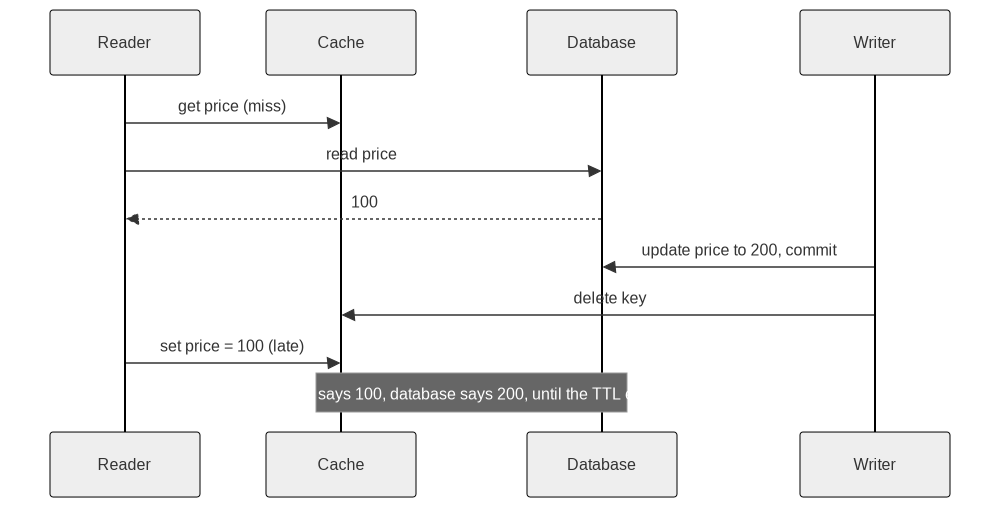
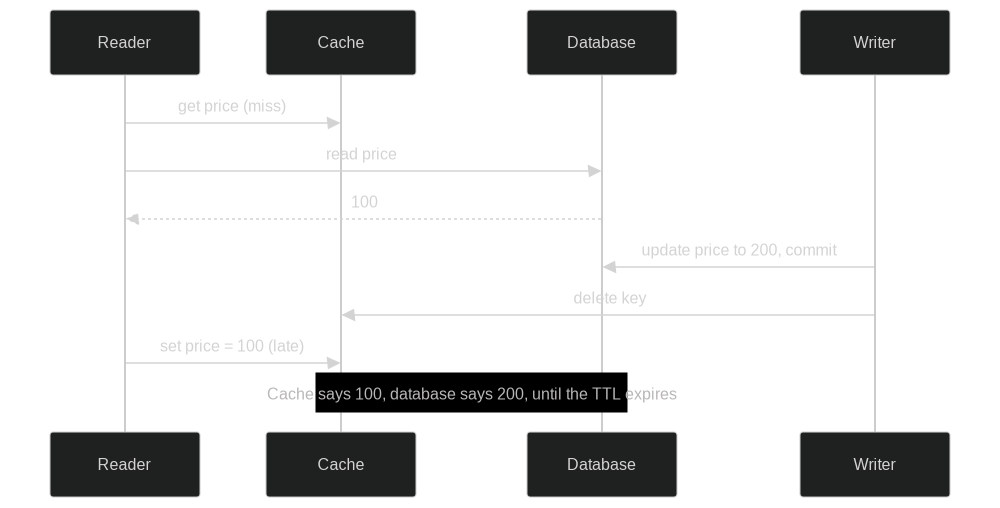
Diagram source
sequenceDiagram
  participant R as Reader
  participant C as Cache
  participant DB as Database
  participant W as Writer
  R->>C: get price (miss)
  R->>DB: read price
  DB-->>R: 100
  W->>DB: update price to 200, commit
  W->>C: delete key
  R->>C: set price = 100 (late)
  Note over C,DB: Cache says 100, database says 200, until the TTL expires
The database says 200, the cache says 100, and nothing will fix it until the TTL expires. In a busy system, step 3 being a few milliseconds late is routine: a GC pause, a slow network hop, a context switch.
| Strategy (TTL 60 s) | Database | Cache afterwards | Stale for |
|---|---|---|---|
| Delete after the write | 200 | 100 | until the TTL (60 s) expires |
| Delete, then delete again after 500 ms | 200 | empty | 500 ms |
| Versioned writes | 200 | 200 | never |
The “delete twice” fix is a false lead: it narrows the window but doesn’t close it, because a reader slower than the delay still wins. The fix that closes it is a version number that only ever grows, compared inside Redis so the check and the write are atomic:
-- KEYS[1] = cache key; ARGV[1] = "price:version"; ARGV[2] = version; ARGV[3] = TTL in ms
local cur = redis.call('GET', KEYS[1])
if cur then
  local v = tonumber(string.match(cur, ':(%d+)$'))
  if v and v >= tonumber(ARGV[2]) then return 0 end   -- the cache already has this or newer
end
redis.call('SET', KEYS[1], ARGV[1], 'PX', ARGV[3])
return 1
The writer, after its commit, sets the new version (write-through) instead of deleting; readers fill the cache through the same script. The late reader’s version 1 can never replace version 2. Take a moment to admire how little that costs: a number that only grows, a comparison done in one place, and the race becomes impossible rather than unlikely. The version comes from the row itself (version = version + 1 in the UPDATE), so concurrent writers are ordered by the database.
Case 2: permissions (a cache that outlives a rollback) #
The bug: a request updates a user’s role, updates the cache, and then something later in the same request fails, so the transaction rolls back. If the cache was written inside the transaction, it now holds a value that was never committed. The cache is remembering something that never happened.
The demo uses the same price row, changed from 100 to 300 inside a transaction that then rolls back:
| Strategy | Readers got | Database has |
|---|---|---|
| Set the cache inside the transaction | 300 | 100 |
| Touch the cache only after commit | 100 | 100 |
For prices that’s a wrong number. For permissions it’s a security bug: a role that was never granted, or a revocation that didn’t happen. Rule: only change the cache after the commit succeeds, and if that cache update fails, delete the key rather than leave it. For permissions specifically, keep TTLs short, so a missed invalidation heals quickly.
Case 3: a hot key (the stampede) #
This one is more about load than correctness, and the numbers are striking.
The problem: a popular key (a homepage feed, a leaderboard, a product on sale) expires. In the next few milliseconds, every request for it misses and goes to the database. I sent 200 concurrent readers (4 app instances × 50) at a key that had just expired, with a 50 ms database query behind it:
| Strategy | Database queries | p50 | p99 | Served the old copy |
|---|---|---|---|---|
| Naive cache-aside | 130 | 123.9 ms | 221.7 ms | 0 |
singleflight in each of 4 app instances |
4 | 51.4 ms | 51.8 ms | 0 |
Redis lock (SET NX): one loader, the rest wait |
1 | 64.5 ms | 68.2 ms | 0 |
| Stale-while-revalidate: serve the old copy, one refresher | 1 | 4.5 ms | 5.7 ms | 200 |
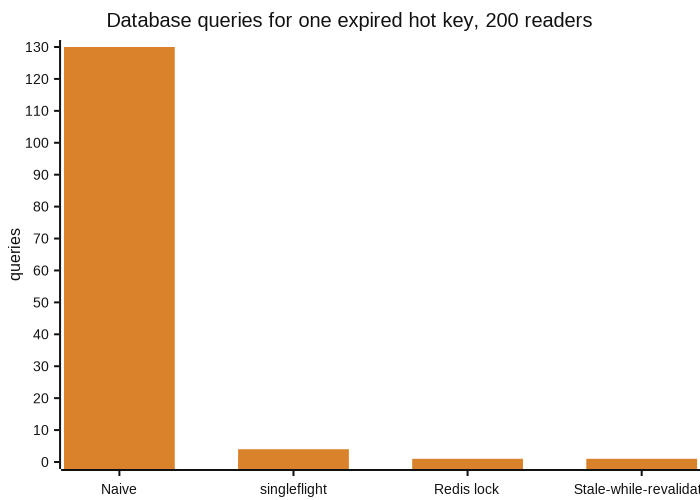
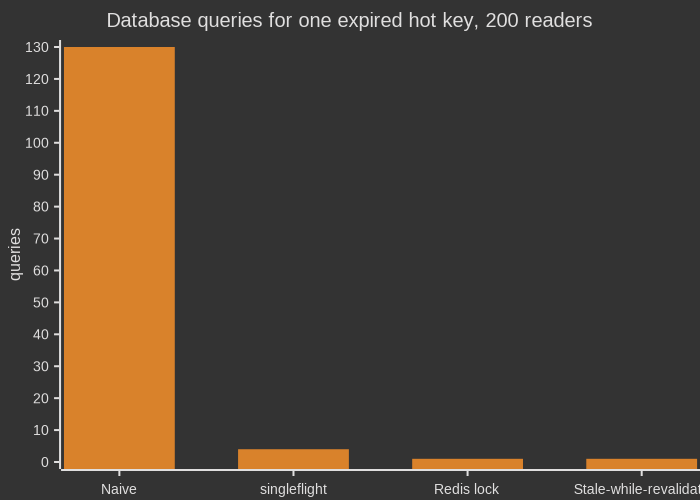
Diagram source
xychart-beta
  title "Database queries for one expired hot key, 200 readers"
  x-axis ["Naive", "singleflight", "Redis lock", "Stale-while-revalidate"]
  y-axis "queries" 0 --> 130
  bar [130 , 4 , 1 , 1]
Naive caching turned one expired key into 130 database queries. They queued for the 50-connection pool, so even the median reader waited more than twice the query time. On a real hot key under real load, that’s how a cache expiry becomes a database outage.
Three fixes, each trading something different:
singleflight(Go’sgolang.org/x/sync/singleflight, or an in-memory promise map in Node) collapses concurrent misses inside one process: one query per app instance. No coordination, no extra round trips; the cost is one load per instance, which is fine until you run hundreds.- A Redis lock (
SET key:lock 1 NX PX 5000) makes one loader across all instances; everyone else polls the cache briefly. One query total, at the price of a few extra round trips and a lock to clean up. After taking the lock, check the cache once more before loading: another loader may have filled it and released the lock between your miss and yourSET NX. My first version skipped that and occasionally loaded twice under load. It’s a lock for preventing duplicate work, not for correctness (the Redis lock post explains the difference): if it expires early, the worst case is two loads. - Stale-while-revalidate keeps serving the old copy after its soft expiry while one request refreshes it in the background. Readers never wait (4.5 ms here); the cost is that for a moment they get data that’s slightly old, which is the intended behaviour for a feed and never acceptable for a balance.
Case 4: everything expires at once #
After a deploy or a cache flush, thousands of keys get cached in the same second with the same TTL, so they all expire in the same second too. I cached 2,000 keys at once with a 1 s TTL and read them continuously for 3 s:
| Strategy | Peak database queries in any 100 ms | Total queries |
|---|---|---|
| Same TTL for every key | 1,661 | 4,000 |
| TTL ±30% random jitter | 343 | 4,759 |
Jitter cut the peak by about 5×, which is a lot for a few lines of randomness. It isn’t free: because some keys now get shorter TTLs, total queries went up by about 19%. That’s usually the right trade, since databases fall over on peaks, not averages.
Matching the fix to the case #
The good news is that you don’t need every fix everywhere. Match it to how fresh each kind of data has to be.
| Data | Freshness need | Default |
|---|---|---|
| Prices, stock, balances | Must not go backwards | Write-through after commit with versioned sets; short TTL as a backstop; or don’t cache at all (a read replica lags too, so read your own writes from the primary) |
| Permissions, sessions, feature flags | Must reflect revocations quickly | Delete after commit, short TTL (seconds to a minute) |
| Feeds, recommendations, counts | Slightly old is fine | Stale-while-revalidate, TTL jitter |
| Hot keys of any kind | - | Collapse misses (singleflight per instance; a lock if instances are many) |
Remember this
- A cache is a second copy, and only your code keeps it in sync.
- Touch the cache only after commit, with a version that only grows.
- Collapse concurrent misses and jitter TTLs: databases fall over on peaks.
What to do on Monday #
- Cache after commit, never inside the transaction, and on any doubt, delete the key rather than write it.
- Put a version on everything you cache that a write can change, and refuse to overwrite a newer version. It’s a few lines of Lua and it removes a whole class of race.
- Always set a TTL, even with invalidation: it’s what heals the bug you haven’t found yet.
- Add ±10-30% jitter to TTLs, and protect any key that more than a handful of requests share with
singleflightor stale-while-revalidate. - Measure the hit rate and the database load at expiry, not only the average latency. Every problem above looks fine in an average.
What I find reassuring about this case is that none of the fixes is exotic. A version number, a commit boundary, a pinch of jitter: small, well-understood ideas that turn a cache from a source of surprises back into what it should be, a fast and honest copy. If you want the next case, the Redis lock post picks up where the stampede left off.
Checked on Redis 7.4.12, PostgreSQL 17.11 and go-redis 9.23.0 (Nov 2026), all on one laptop; across a network, the extra round trips of the lock and the Lua script cost more. Code and full results: database-tradeoffs-lab/04-cache-consistency.
Comments
No comments yet.
Sign in to comment. We'll email you a link; no password needed.