How do you build search autocomplete?
For a catalogue of thousands of items, a sorted list and a binary search answer prefixes in microseconds. For popularity-ranked suggestions over millions of queries, precompute the top few completions for every prefix. Typo tolerance, debouncing and caching matter as much as the data structure.
The verdict, which the clues below will earn: pick the structure by what you’re completing and how results are ranked.
- A few thousand to a few million fixed items (products, cities, commands): a sorted array with binary search, or a trie, answers a prefix in microseconds.
- Popularity-ranked suggestions from what people search: precompute the top 5-10 completions for every prefix offline, and serve them from a key-value store or memory. A lookup is one key.
- Typos, synonyms and relevance across large text: use a search engine (OpenSearch, Elasticsearch, Typesense, Meilisearch, or PostgreSQL with trigram indexes) with an edge n-gram or prefix field.
- On the client: debounce keystrokes (100-200 ms), cancel stale requests, and cache responses per prefix.
Autocomplete is one of those features people only notice when it’s slow. You type three letters, the box stutters, suggestions arrive for a prefix you’ve already moved past. The usual suspect is the obvious one: “we need a proper search engine.” Sometimes that’s right. But what I enjoy about this case is how far a little cleverness goes: often the culprit is doing the work at the wrong time, and the answer is a sorted list and a bit of work done ahead of time.
Case file
The case The box stutters and suggestions arrive for an old prefix Suspects “We need a proper search engine” Culprit Doing the work at the wrong time The fix A sorted list, or top-k per prefix precomputed offline, plus debounce and cache Evidence The part-number benchmark: 5.6 µs vs 563 µs on 100,000 items
The line-up #
| Sorted array + binary search | Trie | Precomputed top-k per prefix | Search engine | |
|---|---|---|---|---|
| Lookup | O(log n) to find the range | O(length of prefix) | One key lookup | Index query |
| Ranking | By order, or sort the matches | By walking the subtree, or stored top-k at each node | Built in | Relevance scoring, custom |
| Typo tolerance | No | With extra work | Only for typos seen in logs | Yes (fuzzy matching) |
| Memory | Smallest | Large (many nodes) | Large: prefixes × k | On disk, managed |
| Updates | Rebuild or insert | Insert | Rebuilt periodically | Near real time |
| Good for | Fixed lists | Fixed lists, shared prefixes | Query suggestions at scale | Product and content search |
Case 1: product search in a catalogue #
Situation: a distributor’s catalogue of 100,000 part numbers and descriptions; users type a part number or a few words.
What I’d build:
- Part numbers: normalise (upper case, strip spaces and dashes), keep them sorted, and binary-search the prefix. My part-number matching benchmark measured exactly this: on 100,000 items, a sorted array answered a prefix in 5.6 µs, against 563 µs for a scan. I still enjoy that gap: binary search, one of the oldest tricks we have, wins by a factor of about a hundred. The scan was never the right suspect to hire.
- Descriptions: an inverted index from words to items, so “hex bolt m8” intersects three small lists.
- Typos: a symmetric-delete or BK-tree index for “did you mean”, measured in the same post.
The search cluster turns out to be a red herring here. This fits in memory on one server and needs no search cluster at all.
Case 2: query suggestions for a large site #
Situation: millions of users; suggestions should be what people actually search, ranked by popularity and freshness.
What I’d build: precomputed top-k per prefix. This is the reveal I find most satisfying. The idea is lazy in the best sense: do all the hard ranking once, offline, so that every keystroke is one lookup.
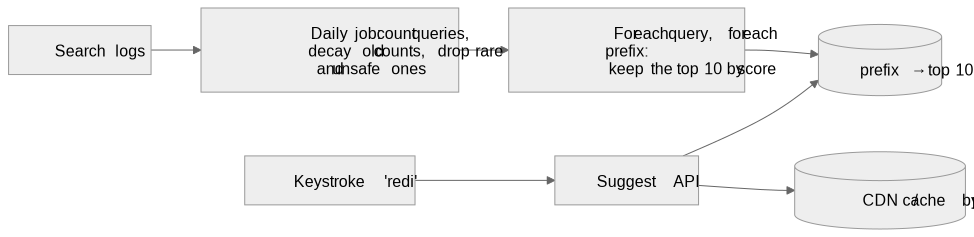
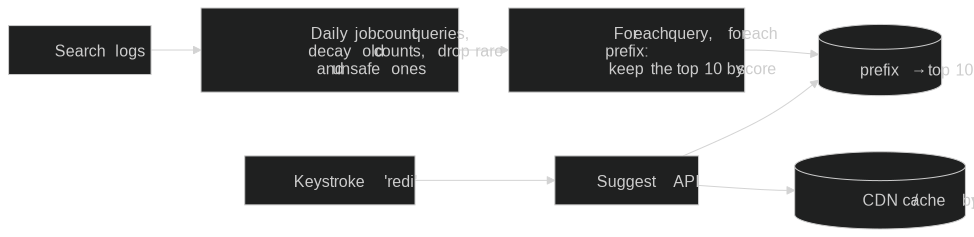
Diagram source
flowchart LR
  L[Search logs] --> AGG[Daily job: count queries,<br/>decay old counts, drop rare and unsafe ones]
  AGG --> BUILD[For each query, for each prefix:<br/>keep the top 10 by score]
  BUILD --> KV[(prefix → top 10)]
  U[Keystroke 'redi'] --> API[Suggest API] --> KV
  API --> C[(CDN / cache by prefix)]
- Offline: aggregate search logs, apply time decay so trends rise and fade, remove queries that are rare (privacy) or unsafe, then for every prefix of every surviving query keep the 10 best. Counting the most frequent queries can itself use a top-k sketch when logs are huge.
- Online: one lookup by prefix. Short prefixes are the hottest and cache perfectly, at the CDN or in memory.
- Freshness: rebuild daily; add a small real-time layer for trending queries if needed.
A trie with a top-k list at each node is the same idea in a different shape, wearing a disguise; at scale, a flat prefix → list table is easier to shard and cache.
Case 3: an address or city picker #
Situation: a form field for a city or a street address.
What I’d build: for cities, a sorted list in the browser, no server at all (a few hundred KB compressed). For full addresses, a geocoding API or a search engine with an edge n-gram field, ranked by distance from the user’s approximate location (the nearby-search post).
The accomplice: the client side #
A perfect index can still feel slow if the browser fires a request for every key and paints whatever comes back last. Half of the case is solved here:
- Debounce: send a request only after typing pauses for 100-200 ms.
- Cancel stale requests, and ignore responses for an older prefix that arrive late.
- Cache per prefix in the browser; backspacing shouldn’t hit the server again.
- Minimum length: for big datasets, start at 2-3 characters.
- Accessibility: use the ARIA combobox pattern so keyboard and screen-reader users can choose suggestions.
Remember this
- Fixed list: binary search on a sorted array, in memory.
- Popularity ranking: rank offline, so each keystroke is one lookup.
- Debounce, cancel stale requests, and cache per prefix on the client.
Case closed: what I’d do by default #
- Sorted array or trie in memory for fixed lists up to a few million items.
- Precomputed top-k per prefix for popularity-ranked suggestions, rebuilt daily.
- A search engine when you need typo tolerance and relevance over large text.
- Debounce, cancel and cache on the client.
- Filter suggestions for privacy and safety before they ever reach the index.
Autocomplete feels instant when someone has thought carefully about where the work should happen. That’s the whole solution in one sentence, and it rewards that thinking at every layer, from the index to the keystroke.
Comments
No comments yet.
Sign in to comment. We'll email you a link; no password needed.