If MongoDB is schemaless, why do we write Mongoose schemas? Why not one collection for everything?
MongoDB stores whatever you write; Mongoose checks only what goes through Mongoose, and not all of that. Measured on MongoDB 8.2: what each layer enforces, and what one shared collection costs.
The verdict, as the evidence will show: MongoDB isn’t schemaless, it’s schema-flexible: the server stores whatever you send unless you tell it otherwise. A Mongoose schema is a check inside one Node.js app; it doesn’t protect the data from any other writer, and even inside the app some updates skip it. For rules that must always hold, add a $jsonSchema validator to the collection so MongoDB enforces them on every write. And don’t put every type in one collection. Indexes, TTL rules, shard keys and permissions all work per collection, so in a shared collection every type pays for, and is exposed to, everyone else’s settings.
Case file
The case An order with a negative total and an unknown status got in Suspects “Schemas are pointless”, “Mongoose schemas cover everything” Culprit Writes that skip Mongoose: native driver, updates without runValidators,$incThe fix A $jsonSchemavalidator on the collection, one collection per typeEvidence MongoDB 8.2.12 with Mongoose 8.24.8 ( make mongo)
The case #
An order turns up with a negative total and a status nobody recognises. The Mongoose model forbids both. So who let it in? This case is worth untangling, because the answer is more interesting than either “schemas are pointless” or “schemas are everything”. The flexibility is real and useful; the trick is seeing exactly where each layer of checking stands guard, and where it doesn’t.
I measured each claim below on MongoDB 8.2.12 with Mongoose 8.24.8. The evidence is in database-tradeoffs-lab, and make mongo reproduces every result.
Three places a schema can live #
| Mongoose schema | $jsonSchema validator |
Single-table design (DynamoDB) | |
|---|---|---|---|
| Where it runs | In your Node.js process | In the MongoDB server | In your access-pattern design (keys), not in a validator |
| What it checks | Document saves through Mongoose; updates only with runValidators, and only some operators |
Every insert and update, from any client | Nothing about attributes beyond the key: shape is your code’s job |
| Bypassed by | The native driver, other services, scripts, mongosh, updates without runValidators, $inc |
Nothing at write time (a bypassDocumentValidation option exists for privileged users) |
- |
| Also gives you | Casting, defaults, middleware, a typed model in code | A query to find existing bad data: {$nor: [{$jsonSchema: …}]} |
One request for related items, if you know every access pattern up front |
| Pick it when | Always, for developer ergonomics in a Node app | Several writers, or rules that must never be broken | DynamoDB, with known, stable access patterns |
They aren’t rival suspects: each one covers something the others don’t. In a MongoDB app you usually want the first two: Mongoose for the code, $jsonSchema for the data.
1. Mongoose only guards what goes through Mongoose #
The scene: an orders API in Node.js with a Mongoose model, plus a Python job that adjusts totals, a Go service that updates status, and engineers who fix data in mongosh.
Let’s reconstruct what actually happens. I wrote the same invalid order (a customerId that isn’t an ObjectId, status: "bogus", a negative total, an item with qty: 0 and no sku) four ways:
| Write | Result |
|---|---|
Mongoose new Order(bad).save() |
rejected: ValidationError |
Native driver insertOne(bad): any other service, script or shell |
accepted |
Mongoose updateOne({$set: {status: "bogus"}}), default options |
accepted: update validators are off by default |
Same, with {runValidators: true} |
rejected |
Mongoose updateOne({$inc: {total: -1000}}, {runValidators: true}) |
accepted: runValidators doesn’t cover $inc |
With the global mongoose.set('runValidators', true): $set status / $inc total |
rejected / still accepted |
The last two rows are the twist that surprises people most. Even code that does use Mongoose writes invalid data through ordinary updates unless every call passes runValidators: true, and even then $inc goes unchecked, so a min: 0 on a balance doesn’t stop a decrement below zero. The guard was at the front door; the culprit used the side entrance.
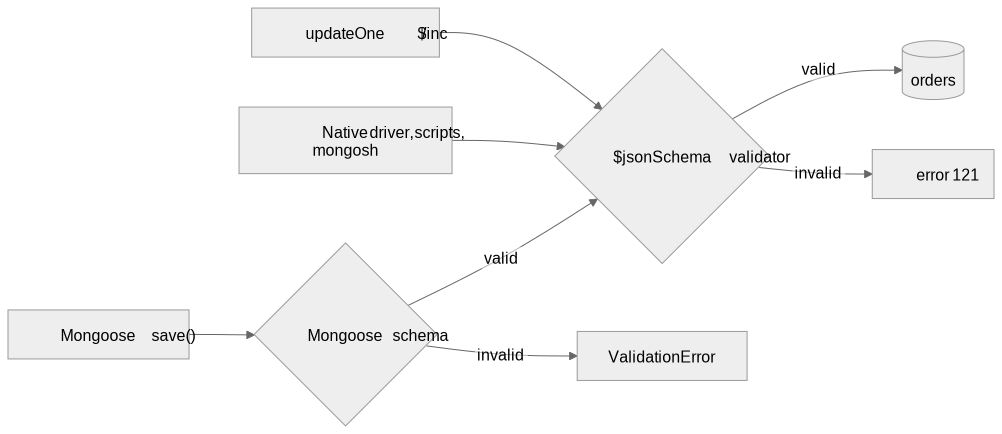
Diagram source
flowchart LR
  M["Mongoose save()"] --> MV{"Mongoose schema"}
  U["updateOne / $inc"] --> S
  N["Native driver, scripts, mongosh"] --> S
  MV -->|valid| S{"$jsonSchema validator"}
  MV -->|invalid| R1["ValidationError"]
  S -->|valid| DB[("orders")]
  S -->|invalid| R2["error 121"]
2. The reveal: $jsonSchema lets MongoDB enforce it #
The fix is to move the rules into the server itself. The same rules as a collection validator (available since MongoDB 3.6):
await db.command({
  collMod: 'orders',
  validator: { $jsonSchema: {
    bsonType: 'object',
    required: ['customerId', 'status', 'total', 'items'],
    properties: {
      customerId: { bsonType: 'objectId' },
      status: { enum: ['pending', 'paid', 'shipped'] },
      total: { bsonType: ['double', 'int', 'long', 'decimal'], minimum: 0 },
      items: { bsonType: 'array', minItems: 1, items: {
        bsonType: 'object', required: ['sku', 'qty'],
        properties: { sku: { bsonType: 'string' }, qty: { bsonType: ['int', 'long', 'double'], minimum: 1 } },
      } },
    },
  } },
  validationLevel: 'strict',
  validationAction: 'error',
});
| Write (after adding the validator) | Result |
|---|---|
| Native driver: insert the bad order | rejected, error 121 (DocumentValidationFailure) |
Native driver: $set status to "bogus" |
rejected, 121 |
Native driver: $inc total by -1000 |
rejected, 121 |
| A valid order, through the driver or Mongoose | accepted |
Now it doesn’t matter which language or tool writes: the server checks the document as it would be after the write. And here’s the elegant part. Because it checks the result rather than the operation, $inc can’t sneak past it. There’s no side entrance left.
Two things to know before you add one to an existing collection:
- It doesn’t check data already stored. The invalid order inserted earlier was still there afterwards. The validator itself can find such documents:
db.orders.find({$nor: [{$jsonSchema: schema}]}). Run that first and fix or migrate what it returns. strictvsmoderate. Withstrict, even updating an unrelated field of an old invalid document failed (error 121). Withmoderate, that update went through, while new invalid documents were still rejected.moderateis the safe way to switch validation on for a collection with history.validationAction: "warn"(logs instead of rejecting) is another rollout step; I didn’t measure that one.
3. A false lead: one collection for everything #
The scene: “MongoDB is schemaless, so let’s put users, orders, quotes and sessions in one collection with a type field.” It’s a tempting idea. It saves a few lines of code and costs this:
A TTL index meant for one type deletes another #
Sessions should expire, so the shared collection gets a TTL index on expiresAt. Quotes also have an expiresAt: “valid until”, which you keep for the record after it passes.
| Layout | Sessions left | Quotes left |
|---|---|---|
One collection, TTL index on expiresAt |
0 | 0: the quote was deleted |
Separate sessions and quotes collections |
0 | 1 |
One collection, TTL index with partialFilterExpression: {type: "session"} |
0 | 1 |
A TTL index deletes any document whose field has passed, whatever its type. This is the kind of quiet crime that surfaces months later, when someone adds a field with a reused name. A partial TTL index fixes it, if you remember to use one every time.
Every type pays for every other type’s indexes #
I inserted 50,000 sessions into a shared collection that also carried the indexes orders, products and users need (customerId, status + createdAt, sku, email) plus token for sessions. Median of 3 runs:
| Layout | Insert time | Index size | Keys in the customerId index |
|---|---|---|---|
| One collection, plain indexes | 712 ms | 1.79 MB | 50,000: a null entry for every session |
One collection, partial indexes ($exists) |
386 ms | 1.04 MB | 0 |
Separate sessions collection |
364 ms | 1.02 MB | - |
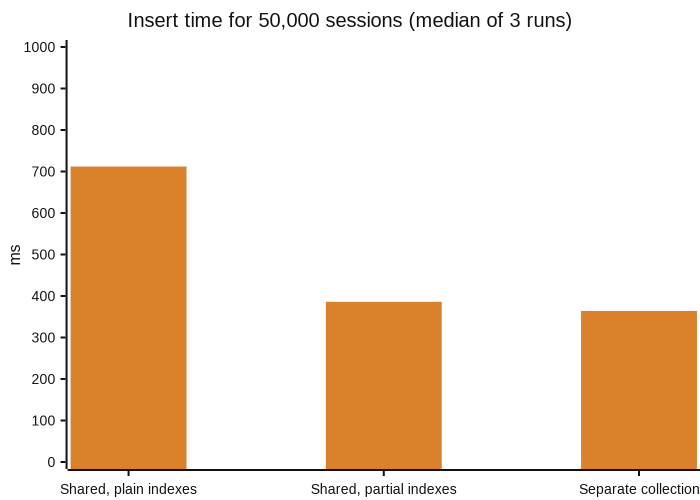
Diagram source
xychart-beta
  title "Insert time for 50,000 sessions (median of 3 runs)"
  x-axis ["Shared, plain indexes", "Shared, partial indexes", "Separate collection"]
  y-axis "ms"
  bar [712 , 386 , 364]
A plain index has an entry for every document, including ones that don’t have the field, so sessions were written into four indexes they never use, making inserts about twice as slow. Partial indexes get back to the separate-collection numbers, but now every index in the codebase must carry the right filter, forever.
Things that are per collection, and can’t be split by type #
Not measured in the demo, but just as damning:
- Shard key. A sharded collection has one shard key. Orders want to be sharded by customer, sessions by token, events by time; one collection forces one choice on all of them. (Resharding exists since MongoDB 5.0, but it’s a heavy operation, not a design tool.)
- Permissions. MongoDB grants privileges per database and per collection. A reporting user that may read orders but not sessions needs them in different collections.
- Validators. One
$jsonSchemaper collection: with every type in one place, the validator becomes a bigoneOfthat nobody maintains.
The 16 MB document limit #
The other “one of everything” mistake is one document per customer with every order embedded. I pushed 1 MiB of order history at a time: 15 pushes succeeded, the 16th failed with error 10334 (BSONObjectTooLarge) at about 15.7 MB. Embed what’s bounded and read together (an order’s line items); reference what grows without limit (a customer’s orders). For files, use object storage or GridFS.
Why single-table design works in DynamoDB but not as a MongoDB habit #
The single-collection idea usually comes with an alibi: DynamoDB does it. And it does. Its single-table design deliberately puts several entity types in one table, and it’s a clever design for the constraints it was built around. It works there because:
- you design keys for known access patterns up front (e.g. partition key
CUSTOMER#42, sort keysORDER#…,QUOTE#…), so one query fetches related items together; - DynamoDB has no joins, so co-locating related items in one partition is how you avoid many round trips;
- items are capped at 400 KB (as of Nov 2026), which pushes you to many small items rather than one growing document;
- TTL, capacity and access control are designed around that table from the start.
MongoDB has $lookup, secondary indexes on any field, and per-collection TTL, validation, sharding and permissions. Copying single-table design gives up those features without the reason DynamoDB needs it, so the alibi doesn’t hold. If your access patterns are few, known and stable, DynamoDB itself may be the better fit; the Postgres or DynamoDB case covers that choice.
Remember this
- Mongoose guards one app’s front door;
$jsonSchemaguards the data.$incand updates withoutrunValidatorswalk past Mongoose.- Indexes, TTL, shard keys and permissions are per collection, so give each type its own.
What I’d do on Monday #
- One collection per entity type, plus embedding for what’s bounded and always read together.
- Mongoose schemas for the code: types, defaults, casting. Set
runValidators: trueglobally (mongoose.set('runValidators', true)) so updates are checked too, and remember$incstill isn’t. - A
$jsonSchemavalidator on every collection that more than one service, script or person writes to, rolled out withvalidationLevel: "moderate"after a$norquery has found the existing bad documents. - Partial indexes whenever a field exists on only some documents, and never a TTL index on a field name that another type might reuse.
Once you see that “schemaless” means “you decide where the schema lives”, the mystery dissolves, and MongoDB’s flexibility stops being a trap and becomes a tool you can use on purpose.
Checked on MongoDB 8.2.12 and Mongoose 8.24.8 (Nov 2026). MongoDB 8.0 refused to start on this machine’s Linux 7.0 kernel (a known issue, SERVER-121912); 8.2 runs. Code and full results: database-tradeoffs-lab/03-mongodb-schemas.
Comments
No comments yet.
Sign in to comment. We'll email you a link; no password needed.