What happens when you call a company's support number?
A support call is two journeys: SIP signalling sets it up, RTP packets carry your voice. Between them sit a border controller, a media server running the menu, a queue that picks the agent, and a recorder. Here is the whole path, and the bug that hides in the gap.
The short answer: your call leaves the phone network at a carrier and enters the company’s cloud phone system as SIP, a text protocol that only sets the call up. Your actual voice travels separately as RTP, small audio packets sent fifty times a second. A session border controller guards the edge, a media server plays the “press 1” menu and listens for your keypress, a queue picks the agent who has waited longest, and the server joins your call to theirs, recording both sides on the way. Signalling and media take different routes, and almost every strange phone bug lives in the gap between them.
It is 9:47 on a Monday morning. A customer dials the support number printed on an invoice. Within two seconds a voice says “Thank you for calling”, within thirty they are talking to an agent in another city, and the recording of the conversation is already sitting in storage before they hang up. Nobody in the chain thinks of this as remarkable.
And then, one Thursday, the support team files a strange report: calls connect, the timer runs, the agent hears the customer perfectly, but the customer hears nothing. Not every call. About one in twelve. Only since Tuesday.
Let’s follow a call from the first ring and find out where the silence went.
Case file
The case One call in twelve connects, but the caller hears silence Suspects The carrier, the agents’ headsets, “the internet” Culprit The media path, not the call setup: an address inside the call’s own description pointed somewhere unreachable The fix Know that signalling and media are two separate journeys, and check them separately Evidence SIP message traces and RTP packet counts from both legs
The two journeys of a single call #
Here is the idea that makes everything else make sense, and it’s a lovely one. A phone call is two conversations at once:
- Signalling is the conversation about the call: who is calling whom, is the other side ringing, did they answer, which audio format will we use, where should the audio go, and finally, goodbye. On the internet this is SIP (Session Initiation Protocol, RFC 3261), and it reads like HTTP:
INVITE,180 Ringing,200 OK,ACK,BYE. - Media is the call itself: your voice, cut into small packets and sent over RTP (RFC 3550), usually one packet every 20 milliseconds. With the classic G.711 codec that is 64 kbit/s of audio, 160 bytes of sound per packet, fifty packets a second in each direction.
The two never share a connection. Inside the SIP INVITE sits a small block of text in SDP (Session Description Protocol) that says, in effect, “send my audio to this IP address and port, in this format”. Signalling agrees where the media should go; then the media goes there on its own, often through a completely different set of machines.
That separation is the design’s quiet genius. Signalling is small, infrequent and can tolerate a little delay; media is constant, heavy and hates delay. Splitting them lets each be routed, scaled and secured in the way that suits it. It is also, as our case will show, exactly where calls go strange.
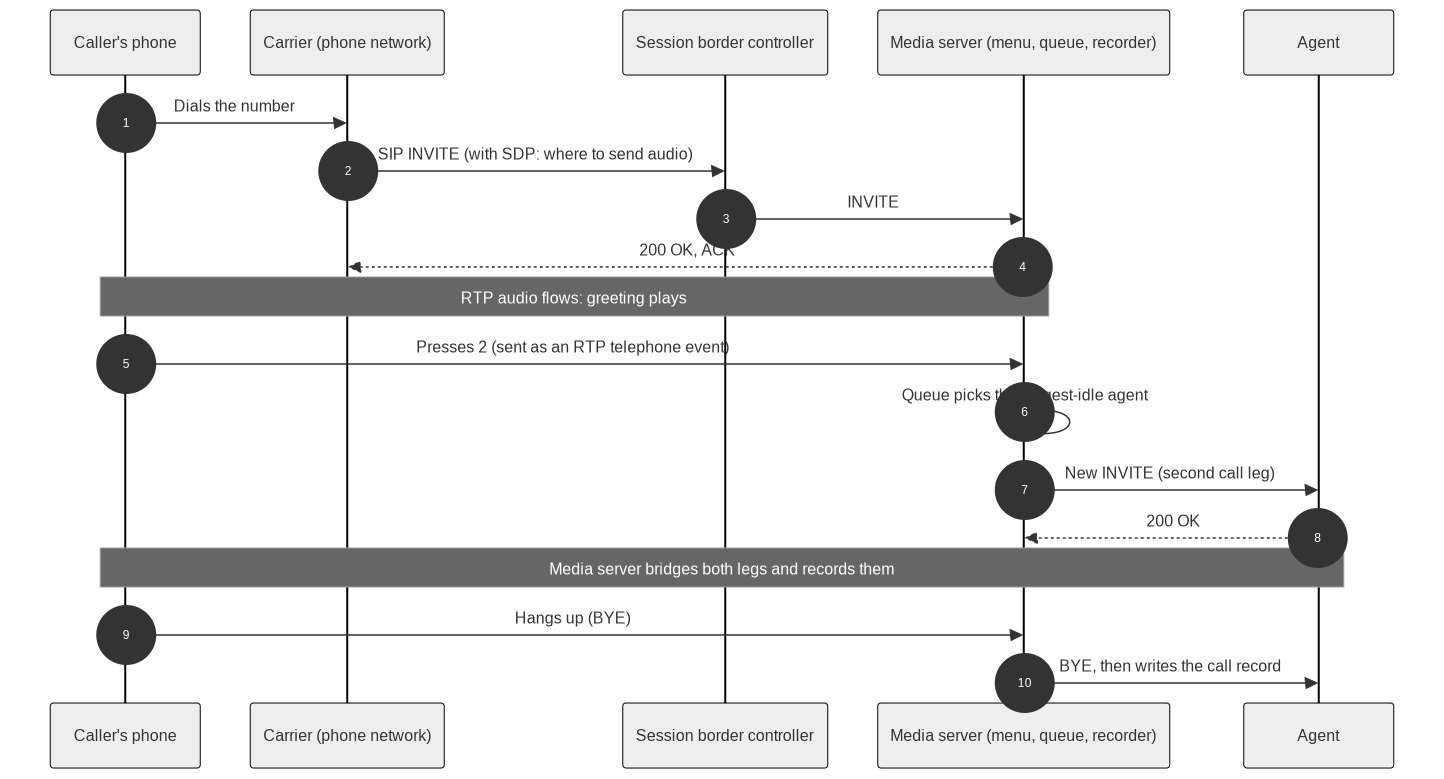
Diagram source
sequenceDiagram
  autonumber
  participant C as Caller's phone
  participant K as Carrier (phone network)
  participant S as Session border controller
  participant M as Media server (menu, queue, recorder)
  participant A as Agent
  C->>K: Dials the number
  K->>S: SIP INVITE (with SDP: where to send audio)
  S->>M: INVITE
  M-->>K: 200 OK, ACK
  Note over C,M: RTP audio flows: greeting plays
  C->>M: Presses 2 (sent as an RTP telephone event)
  M->>M: Queue picks the longest-idle agent
  M->>A: New INVITE (second call leg)
  A-->>M: 200 OK
  Note over C,A: Media server bridges both legs and records them
  C->>M: Hangs up (BYE)
  M->>A: BYE, then writes the call record
The pieces of the puzzle #
| Piece | What it does | How it fails |
|---|---|---|
| Carrier interconnect | Hands calls between the public phone network and the company’s system, as SIP over a “trunk” | A carrier route goes down; calls to the number fail or go to a busy tone |
| Number mapping | Ties each phone number to a company and an entry point (a menu, a queue, a person) | A number mapped to the wrong flow; callers reach someone else’s menu |
| Session border controller (SBC) | The front door: hides internal addresses, rewrites SDP, enforces limits, blocks floods and toll fraud | Misconfigured address rewriting: one-way or no audio |
| SIP proxies | Route signalling to the right media server; mostly stateless, easy to scale | Overload: calls take seconds to start ringing |
| Media server | Answers the call, plays prompts, collects keypresses, bridges legs, records | Runs out of CPU or ports; pinned calls drop when it restarts |
| Queue / ACD | Holds callers and picks the agent (longest idle, skills, priority) | Wrong rules: some agents swamped, others idle |
| Agent endpoint | A browser (WebRTC), a desk phone, or the agent’s own mobile | Bad Wi-Fi: robotic, choppy voice |
| Recorder and call records | Saves audio, writes the call detail record (who, when, how long, outcome) | Recording lost on a crash; records missing for billing |
The menu that hears your keypress #
When the greeting says “press 2 for billing”, the media server is listening to your audio stream, not your phone line. Modern systems send keypresses as RTP telephone events (RFC 4733): little packets that say “digit 2, still held, released”, carried alongside your voice. Older systems detect the familiar dual tones in the audio itself. Either way, the menu is just a small program running against a live audio stream, and that is why it can be designed in a drag-and-drop flow builder: each box is “play this, wait for that, go here”.
The queue that picks your agent #
The queue is where the call stops being a network problem and becomes a people problem. The usual rule is longest idle agent: whoever has gone longest without a call gets the next one, which spreads the work fairly. Add skills (Hindi, billing, premium customers) and the rule becomes “longest idle agent among those who can handle this caller”, with a fallback to a wider group if the wait grows.
How many agents do you need? This question has a century-old answer that still feels like magic: Erlang C, A. K. Erlang’s 1917 formula for the chance a caller has to wait, given the call rate, the average call length and the number of agents. Feed it your peak hour and it tells you, for example, how many agents keep 80% of callers waiting under 20 seconds. Its sibling, Erlang B, tells you how many simultaneous lines (trunk capacity) you need so that almost nobody gets a busy signal. Telephone engineers were doing capacity planning with closed-form queueing theory long before anyone said “autoscaling”.
The bridge #
When the agent answers, there are two separate calls: you to the media server, and the media server to the agent. The server stands in the middle as a back-to-back user agent: to you it looks like the agent, to the agent it looks like you. It copies audio between the two legs, and because every packet passes through it, it can record both sides, let a supervisor listen in, whisper to the agent, or transfer you without dropping the call.
Click-to-call is the same trick run backwards. A sales app calls an API; the system first dials the agent’s phone, and when they pick up, dials the customer and bridges the two. Neither phone ever called the other. The customer sees the company’s number, the agent never dials by hand, and every call is logged automatically.
The case, solved #
Back to our silent callers. The SIP traces for a failing call looked perfect: INVITE, 180 Ringing, 200 OK, ACK. Every step of the signalling journey succeeded. Then the packet counts gave it away: on the failing calls, the media server was sending audio towards an address starting with 10., a private address that exists only inside one network. Nobody on the internet could deliver packets there.
The culprit was a change made on Tuesday: a new media server had been added to the pool, and its address rewriting at the border wasn’t set. When the call landed on that one server out of twelve, its SDP told the world “send audio to my private address”. The signalling arrived fine; the media had nowhere to go. One server in twelve, one call in twelve.
This is the classic one-way-audio bug, and it’s worth remembering because of what it teaches: a call can be perfectly set up and still carry nothing. When the symptom is about sound, look at the media path (SDP addresses, NAT, firewalls, codecs), not at the signalling that worked.
Three companies, three designs #
Case 1: a small team, five agents, one number #
Situation: a startup wants one support number, a simple menu and calls ringing on agents’ laptops.
What I’d do: buy it. A cloud phone system gives you numbers, a menu builder, queues and browser-based agents (WebRTC) for a monthly fee per user. Building telephony yourself means carrier contracts, regulation and 24/7 on-call for a system where a single bug means silence. The interesting work for this team is the integration: pop the customer’s record on the agent’s screen when the call arrives, and log the call in the CRM through webhooks.
Case 2: a sales team that dials hundreds of people a day #
Situation: agents call leads from a CRM, and managers want every call recorded and logged.
What I’d do: click-to-call through the provider’s API, with call events delivered as webhooks into the CRM (answered, missed, duration, recording link). Make the webhook receiver idempotent: these events will arrive late, twice, or out of order, and the webhook post explains why and what to do about it.
Case 3: building the platform itself #
Situation: you are the phone platform, carrying thousands of calls at once.
What I’d do:
- Keep signalling and media on separate tiers. SIP proxies (Kamailio and OpenSIPS are the well-known open-source ones) scale horizontally and hold little state. Media servers (FreeSWITCH, Asterisk) hold every live call in memory, so they scale by adding servers and draining them before a deploy: stop sending new calls, wait for the old ones to end, then restart.
- Put media servers close to the callers. People notice delay above about 150 ms one way (ITU-T G.114’s guidance), so audio should not cross a continent to reach a server and come back.
- Record to local disk first, then upload to object storage, so a storage hiccup never drops a call.
- Treat call records like money. They drive billing; write them with the same care as payments, through an outbox (see the queue post).
Choosing how to get a phone system #
| Office phone system (on-premises) | Cloud phone system | Communications APIs | Build on open source | |
|---|---|---|---|---|
| What it fixes | Full control, no internet dependence for internal calls | Numbers, menus, queues and agents in days | Telephony inside your own product | Your own platform, your own economics |
| What it costs | Hardware, a specialist, upgrades | A monthly fee per user plus call charges | Per-minute pricing; you build the UI | Carrier deals, regulation, a 24/7 team |
| How it fails | The box in the cupboard dies | The provider has an outage | Your code and theirs, together | Every failure is yours |
| Pick it when | Rarely, today | A support or sales team needs phones | Calls are part of your product | Telephony is your product |
Remember this
- A call is two journeys: SIP sets it up, RTP carries the voice.
- Sound problems live in the media path; setup problems live in signalling.
- The media server sits in the middle of every call, and that’s what makes recording, transfers and queues possible.
What to look at first when a call goes wrong #
- Did the call set up? Read the SIP trace: which response came back, and from where.
- Did audio flow both ways? Count RTP packets on each leg; zero on one side means a media path problem.
- Where was the audio sent? Check the IP addresses inside the SDP: private addresses leaking out are the usual suspect.
- Which server handled it? Problems on one server in N show up as one call in N.
- What does it sound like? Robotic or choppy audio is packet loss or jitter, usually on the agent’s network.
What I find beautiful about telephony is how old its best ideas are and how well they have aged. Erlang’s queueing maths from 1917, the split between talking about a call and the call itself, a server quietly standing in the middle of two conversations: put together, they let a stranger reach the right person in under a minute, and almost nobody ever notices. That invisibility is the whole achievement.
Comments
No comments yet.
Sign in to comment. We'll email you a link; no password needed.