What happens when you reset a few commits and force-push?
Force-pushing after a reset moves the branch pointer on the server; it doesn't delete anything. The dropped commits live on in reflogs, in every teammate's clone and, on GitHub, by SHA. What each teammate sees next depends on how they pull: a merge-pull brings the commits back, a rebase-pull…
The verdict, which the experiment below earns: git reset --hard HEAD~2 followed by git push --force moves the branch pointer on the server back two commits. Nothing is deleted. The two commits stay in your reflog, in the server’s object store, in every clone that already fetched them and, on GitHub, at their SHA. What happens next depends on your teammates: one who pulls with a merge gets “Already up to date” and puts the commits back on their next push; one who pulls with a rebase quietly drops them too. On your own branch it’s routine. On a shared branch, use git revert instead.
Case file
The case Two commits vanish from main, come back a day later, and a build breaks elsewhereSuspects A teammate re-pushing on purpose, a broken force-push Culprit Force-push moves one pointer, and each teammate’s pull setting decides what happens next The fix git reverton shared branches,--force-with-lease --force-if-includeson your ownEvidence Git 2.53.0 on Linux, two clones and a bare remote, script at the end
The case #
Two commits vanish from main. A day later, they’re back, and nobody remembers pushing them. Meanwhile, on another laptop, someone’s build breaks for no visible reason.
Most people learn --force as the scary flag, and then learn it isn’t scary on their own feature branch. The real mystery lives in the middle ground: you’re pretty sure you want those commits gone, and other people have already pulled them. Let’s reconstruct the scene and see what each person’s Git actually does.
The reconstruction #
Two clones, Alice and Bob, share one remote. Alice pushes four commits; Bob clones and adds one commit of his own. Then Alice decides commits 3 and 4 were a mistake:
git reset --hard HEAD~2
git push origin main
Git 2.53.0 on Linux, 12 Nov 2026. The full script is at the end of the post, so you can rerun the whole investigation in a temp directory.
Step 1: a plain push is refused.
 ! [rejected]        main -> main (non-fast-forward)
hint: Updates were rejected because the tip of your current branch is behind
hint: its remote counterpart.
This is Git protecting you: the server only accepts a push that adds to history (a fast-forward). Your branch is now behind the server’s, so the server says no.
Step 2: force it.
$ git push --force origin main
 + be48a59...1b4255a main -> main (forced update)
The + and “forced update” tell you the story: the server’s main used to point at be48a59 (commit 4) and now points at 1b4255a (commit 2). That’s all a force-push is. One pointer moved.
Step 3: are the commits gone? Not even close.
$ git reflog -4
1b4255a HEAD@{0}: reset: moving to HEAD~2
be48a59 HEAD@{1}: commit: commit 4
42fa892 HEAD@{2}: commit: commit 3
1b4255a HEAD@{3}: commit: commit 2
And the server still has the object: git cat-file -t be48a59 on the remote says commit. It’s unreachable from any branch, so it’ll be garbage-collected eventually, but only eventually (more on that below). The body, it turns out, was never buried.
The twist: what your teammate sees depends on how they pull #
Here’s where the case gets interesting. Bob has commits 1-4 plus his own feature. He runs his usual pull.
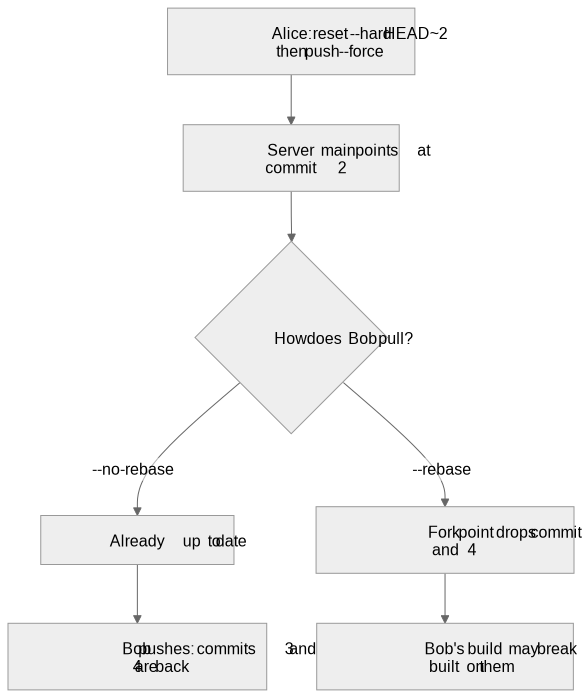
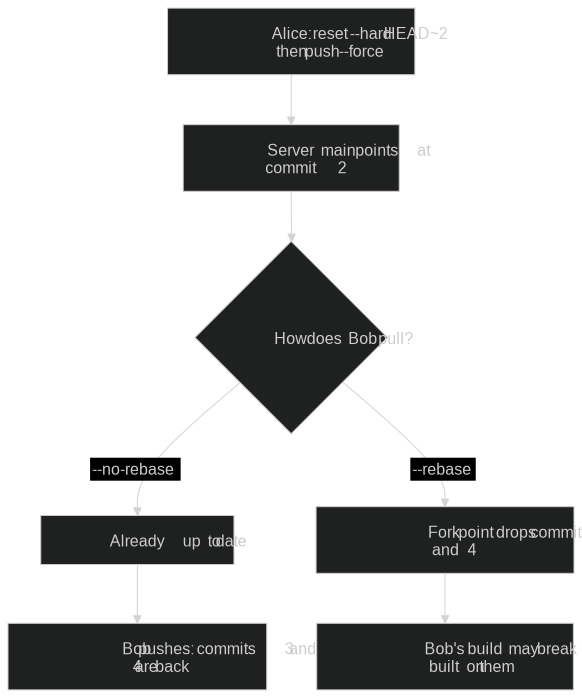
Diagram source
flowchart TD
  A["Alice: reset --hard HEAD~2 then push --force"] --> S["Server main points at commit 2"]
  S --> Q{"How does Bob pull?"}
  Q -->|"--no-rebase"| M["Already up to date"]
  M --> MP["Bob pushes: commits 3 and 4 are back"]
  Q -->|"--rebase"| R["Fork point drops commits 3 and 4"]
  R --> RB["Bob's build may break if he built on them"]
Bob pulls with a merge: the commits come back #
$ git pull --no-rebase origin main
 + be48a59...1b4255a main       -> origin/main  (forced update)
Already up to date.

$ git log --oneline
5c1a442 bob: new feature
be48a59 commit 4
42fa892 commit 3
1b4255a commit 2
804bbfe commit 1
From Git’s point of view, nothing is wrong. The server’s main (commit 2) is an ancestor of Bob’s main, so there’s nothing to merge. Bob sees a “forced update” line he probably scrolls past, and “Already up to date.” Then:
$ git push origin main
   1b4255a..5c1a442  main -> main
A clean fast-forward, no force needed, and the server’s main has commits 3 and 4 again. That’s our mystery solved: Alice’s force-push lasted until the next teammate pushed. Nobody did anything unusual, and nobody got a warning.
GitHub’s own docs on removing sensitive data describe exactly this: a developer with a clone from before the rewrite who “simply runs git pull followed by git push” brings the data back.
Bob pulls with a rebase: the commits disappear for him too #
Same setup, but Bob has pull.rebase = true (or runs git pull --rebase):
$ git pull --rebase origin main
 + be48a59...1b4255a main       -> origin/main  (forced update)
Successfully rebased and updated refs/heads/main.

$ git log --oneline
6763410 bob: new feature
1b4255a commit 2
804bbfe commit 1
This is the part I admire most. git pull --rebase uses the fork point: it checks Bob’s reflog for origin/main, sees that commits 3 and 4 used to be upstream, and concludes they belong to upstream, not to Bob. So it replays only Bob’s own commit onto the new main. Exactly what Alice wanted, and it’s a neat piece of detective work by Git itself: it uses its own history of what the remote looked like to work out whose commits are whose.
The catch is the same as the merge case, mirrored: it’s silent. If Bob had built on commit 3, his work now sits on a base that no longer contains it, and he finds out when something doesn’t compile. That’s the broken build from the opening.
So one force-push, two teammates, two different outcomes, and neither of them saw an error.
A second crime: --force vs --force-with-lease #
A different accident. Bob pushes a hotfix after Alice last fetched. Alice, unaware, resets and force-pushes.
| What Alice runs | Result |
|---|---|
git push --force |
Succeeds. Bob’s hotfix is no longer on main. |
git push --force-with-lease (without fetching first) |
! [rejected] main -> main (stale info). The server’s main isn’t where Alice’s origin/main says it is, so Git refuses. |
git fetch, then git push --force-with-lease |
Succeeds, and wipes Bob’s hotfix. The fetch updated Alice’s origin/main, so the lease matches. |
git fetch, then git push --force-with-lease --force-if-includes |
! [rejected] main -> main (remote ref updated since checkout). Git checks that the remote tip is in Alice’s own reflog, i.e. that she actually integrated it, not just fetched it. |
The third row is the one that catches people. Many editors fetch in the background, which silently “renews” your lease. --force-if-includes (Git 2.30+) closes that gap. If you force-push at all, this is the pair to use:
git config --global alias.pushf "push --force-with-lease --force-if-includes"
The evidence at a glance #
reset + push --force |
reset + push --force-with-lease --force-if-includes |
git revert + normal push |
|
|---|---|---|---|
| What it fixes | Clean history; commits off the branch | Same, but won’t overwrite work you haven’t seen | Undoes the change with a new commit |
| What it costs | Everyone who pulled must notice and fix their clone | Same coordination cost | An extra commit in history |
| How it fails | Overwrites a teammate’s push; a merge-pull resurrects the commits | A merge-pull still resurrects the commits | Rarely: reverting a merge needs -m 1 and care when you re-merge |
| Pick it when | Your own branch, nobody else has it | Your own PR branch after a rebase or squash | Anything shared: main, release branches |
| Avoid it when | Anyone else has pulled | The branch is shared | You’re cleaning up a branch only you use |
Use cases #
1. Tidying your own PR branch #
The scene: you’ve rebased your feature branch onto a newer main and squashed “fix typo” commits before review.
Recommendation: force-push without a second thought, with --force-with-lease --force-if-includes. It’s your branch, the only other “clone” is the PR, and GitHub shows a “force-pushed” entry in the PR timeline with before and after SHAs, so reviewers can still compare. This is what force-push is for.
2. A bad commit on shared main #
The scene: someone merged a broken change to main an hour ago; three people have pulled since.
Recommendation: git revert <sha> and push normally. It’s the only option that works whatever your teammates’ pull settings are, keeps CI and deploy history honest, and needs no message saying “everyone please reset”. If main is protected (it should be: both GitHub’s classic branch protection and rulesets can block force-pushes), you can’t force-push anyway.
3. You pushed a secret #
The scene: an API key went into commit 4, and you’re about to reset and force-push to “remove” it.
Recommendation: rotate the key first. Every clue in this case says why: the commit is still on the server by SHA, in every clone and fork that fetched it, and one merge-pull from a teammate can push it straight back. GitHub’s docs say the same and suggest git filter-repo plus coordination with collaborators and forks if you also want it out of history; GitHub Support will only purge cached views when rotating the credential isn’t enough. Rewriting history is cleanup; rotation is the fix.
4. You force-pushed and wish you hadn’t #
The scene: you reset too far, or wiped a teammate’s commit.
Recommendation: it’s almost always recoverable, and quickly.
- From your own clone:
git reflogshows where you were.git push --force-with-lease origin be48a59:mainputs the server back. - From a teammate’s clone: their
origin/main(or reflog) still points at the old tip until they fetch. Ask them to push it to a new branch before they pull. - On GitHub: the push output and the repository’s activity view show the before and after SHAs of a force-push; the old commit is still viewable by SHA, and you can create a branch from it.
How long the “deleted” commits really last #
In your clone, with Git’s defaults: reflog entries for commits no longer on any branch expire after 30 days (gc.reflogExpireUnreachable), other reflog entries after 90 days (gc.reflogExpire), and unreachable objects are pruned only when git gc runs and they’re older than two weeks (gc.pruneExpire). On a hosting service, garbage collection is on the host’s schedule, and you shouldn’t count on it either way: assume anything pushed was seen.
Remember this
- A force-push moves one pointer, nothing is deleted.
- A teammate’s merge-pull silently puts the commits back.
- Shared branch:
git revert. Pushed secret: rotate first.
What I’d do on Monday #
- Force-push only branches you own, and always as
--force-with-lease --force-if-includes. - Block force-pushes on
mainand release branches with branch protection or a ruleset. - Undo shared mistakes with
git revert, never with reset. - Treat a pushed secret as leaked. Rotate first, rewrite history second, if at all.
- If you must rewrite a shared branch, tell everyone before, and give them the exact command (
git fetch && git reset --hard origin/main, after saving their own work on a branch).
What I find delightful about this case is how gentle Git turns out to be. The command with the scariest flag in daily use mostly moves one pointer, and almost every mistake it makes can be undone from a reflog that’s been quietly keeping notes all along, like a witness who saw everything.
Run it yourself #
Copy into a file and run it; it works in a temp directory and touches nothing else. Swap --no-rebase for --rebase to see the second outcome.
#!/usr/bin/env bash
set -u
work=$(mktemp -d); cd "$work"
git -c init.defaultBranch=main init -q --bare origin.git
git clone -q origin.git alice 2>/dev/null; cd alice
git config user.name Alice; git config user.email alice@example.com
for n in 1 2 3 4; do echo "line $n" >> app.txt; git add app.txt; git commit -qm "commit $n"; done
git push -q origin main

cd ..; git clone -q origin.git bob; cd bob
git config user.name Bob; git config user.email bob@example.com
echo "bob's work" > bob.txt; git add bob.txt; git commit -qm "bob: new feature"

cd ../alice
git reset -q --hard HEAD~2
git push origin main            # rejected: non-fast-forward
git push --force origin main    # forced update
git reflog -4                   # commits 3 and 4 are still here

cd ../bob
git pull --no-rebase origin main   # "Already up to date."
git push origin main               # commits 3 and 4 are back on the server
git -C ../origin.git log --oneline main
Comments
No comments yet.
Sign in to comment. We'll email you a link; no password needed.