Trunk-based development or Git flow?
For a SaaS that deploys often, trunk-based development with short-lived branches and feature flags is faster and safer. Git flow's long-lived branches fit products with versioned releases you must support in parallel. How to choose, and what each needs to work.
Short answer: the verdict, as the cases will show: match the branching model to how you release.
- Trunk-based development (everyone merges small changes to
mainat least daily, behind feature flags where needed, andmainis always deployable) fits services that deploy continuously. - GitHub flow (short-lived feature branches, a pull request, merge to
main, deploy) is the practical form most teams use; it’s trunk-based with code review. - Git flow (
develop,release/*,hotfix/*andmain) fits software shipped as versions you must maintain in parallel: mobile apps, installed products, libraries, regulated releases.
The case usually looks like this: a merge that should take minutes eats an afternoon of conflicts, and the release slips again. The usual suspect is Git itself, or whichever branching model the team happens to use. But I like this question because it isn’t about Git at all: it’s about how your software meets its users. Vincent Driessen’s Git flow write-up gave a generation of teams a shared vocabulary for branches, and trunk-based development answers a different, equally thoughtful question.
Case file
The case A merge eats an afternoon of conflicts, and the release slips again Suspects Git itself, the branching model’s name Culprit How long work stays apart before it comes back together The fix Match the model to how you release: short-lived branches and feature flags, release branches only for versions patched in parallel
The suspects at a glance #
| Trunk-based | GitHub flow | Git flow | |
|---|---|---|---|
| Long-lived branches | main only |
main only |
main, develop, plus release and hotfix branches |
| Branch lifetime | Hours; at most a day or two | Days | Days to weeks |
| Unfinished work | Behind feature flags | Behind flags, or on the branch | On feature branches until the release |
| Merge conflicts | Small and frequent | Small to medium | Large, late |
| Release | Any commit on main |
Any commit on main |
A release branch, stabilised, then tagged |
| Needs | Fast CI, good tests, feature flags | Fast CI, review discipline | Release management, backporting |
| Fits | SaaS deploying many times a day | Most web teams | Versioned products |
The “Merge conflicts” row is the clue that points at the real culprit: not the model’s name, but how long work stays apart before it comes back together.
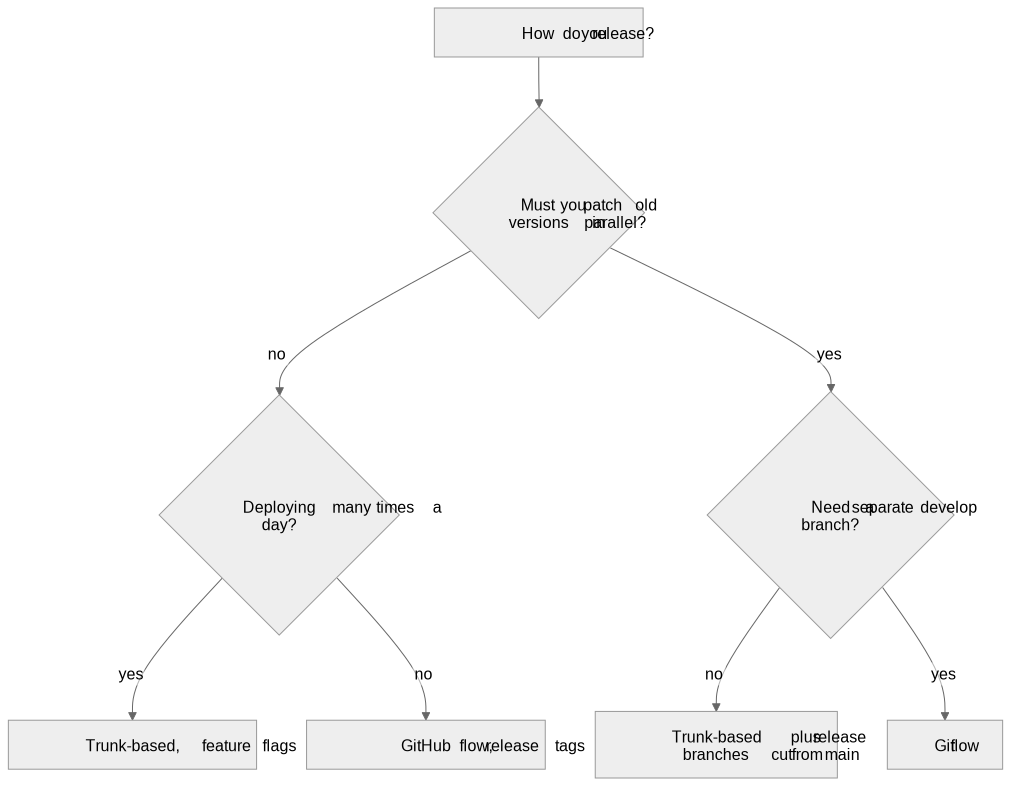
Diagram source
flowchart TD
  A["How do you release?"] --> B{"Must you patch old versions in parallel?"}
  B -- no --> C{"Deploying many times a day?"}
  C -- yes --> T["Trunk-based, feature flags"]
  C -- no --> G["GitHub flow, release tags"]
  B -- yes --> D{"Need a separate develop branch?"}
  D -- no --> R["Trunk-based plus release branches cut from main"]
  D -- yes --> GF["Git flow"]
Case 1: a SaaS deploying daily #
The situation: a web platform with a handful of engineers, deploying several times a day.
What I’d use: GitHub flow, moving toward trunk-based.
- Branches live a day or two; pull requests are small enough to review in fifteen minutes.
- CI runs tests, linting and a security scan on every pull request, and
mainis protected. - Unfinished features merge behind a flag, so a half-built feature never blocks a release or forces a long branch. This is the reveal that makes the whole approach work, and it’s a beautiful bit of separation: you split deploying code from releasing a feature.
- Every merge to
maindeploys to staging automatically; production follows automatically or with one approval. - Database changes use the expand-and-contract sequence, so any commit can be deployed or rolled back on its own (the zero-downtime migrations post).
What it needs: a test suite you trust (testing post), fast CI (minutes, not an hour), and a way to turn features off without a deploy.
Case 2: a mobile app with store releases #
The situation: releases go through app store review, users stay on old versions for months, and a critical bug may need fixing in the version already in users’ hands.
What I’d use: trunk-based development for day-to-day work, plus release branches cut from main for each version.
- Developers still merge small changes to
main. - At release time, cut
release/4.2frommain, stabilise it, and ship it. - Fixes land on
mainfirst and are cherry-picked to the release branch.
This gets the main benefit of Git flow (a stable branch per shipped version) without a separate develop branch. It’s a neat compromise: you keep the one thing Git flow does uniquely well and leave the rest.
Case 3: a regulated release process #
The situation: each release needs sign-off, documented testing and an audit trail; deploys happen weekly or monthly. The tempting lead is that regulation demands heavyweight branches. It usually doesn’t.
What I’d use: trunk-based or GitHub flow for development, with release tags and a release checklist, not long-lived branches.
- The audit trail comes from pull requests (who reviewed what), CI records (what was tested) and tags (what was released), all of which you get anyway.
- A release candidate is a tag on
main; sign-off is recorded against it. The engineering standards repo has a release readiness checklist and a definition of done in this style. - Only add a release branch if you must patch an old release while
mainhas moved on.
The usual accomplices, whichever model you choose #
Every model has its own way of going wrong, and they’re worth spotting early.
- Long-lived feature branches. They hide integration problems until the end. Merge smaller pieces behind flags.
- Feature flags that never die. Every flag needs an owner and a removal date; old flags become untested code paths.
- Slow CI. If CI takes an hour, people batch changes and branches grow. Keep the main pipeline under ten minutes; run slow suites in parallel or nightly.
- Merging without the deploy. “Merged but not deployed” piles up risk. Deploy what you merge, soon.
Remember this
- Match the branching model to how you release.
- Short branches and feature flags split deploying code from releasing a feature.
- Release branches only for versions you must patch in parallel.
Case closed: what I’d do by default #
- GitHub flow: short-lived branches, small pull requests, protected
main. - Feature flags for anything that takes more than a couple of days, with owners and expiry dates.
- Automatic deploys from
mainto staging, and to production with at most one approval. - Release branches only for versions you must patch in parallel.
- Fast CI, treated as a product: when it slows down, fixing it is a priority.
When it’s working, there’s a real pleasure in it: small changes flowing steadily into main, every one of them reviewed, tested and on its way to the people who’ll use it.
Comments
No comments yet.
Sign in to comment. We'll email you a link; no password needed.