Access tokens and refresh tokens: why two, where do they live, and what happens when one leaks?
Why two tokens: a short-lived access token shown to every API, and a longer-lived refresh token shown only to the auth server and rotated, so reusing a stolen one raises an alarm. Diagrams of the flows, where to store each token on web, mobile and server, and what an attacker gets from each kind…
The verdict, which we’ll earn below: two tokens exist so the risk can be split in two.
- Access token: sent with every API request, to many services. Because it’s exposed so often, it expires quickly (5-15 minutes) and is usually not revocable. If it leaks, the attacker has minutes.
- Refresh token: sent only to the authorisation server, only to get new access tokens. It lives longer (days to weeks) but can be revoked at any time, and with rotation each one works once. If a stolen one is used, the server notices the reuse and kills the whole session.
- Where they live: on the web, ideally neither is readable by JavaScript: keep tokens on your server and give the browser an HttpOnly session cookie (the backend-for-frontend pattern). On mobile, the refresh token goes in the Keychain / Keystore; the access token in memory.
Here is the puzzle that sets the case in motion. A credential that gets shown to every service, on every request, will eventually be seen by someone it shouldn’t be. A credential that has to keep a user signed in for weeks must live a long time. Ask one token to do both and you’ve built something that is both widely exposed and long-lived, which is exactly what a thief hopes to find. The two-token design is a tidy piece of risk accounting that refuses that bargain: two credentials, each good at exactly one of those jobs. Let’s follow them through a real session and watch the split pay off.
Case file
The case One credential can’t be both widely shown and long-lived Suspects A single long-lived token, localStorage, missing revocationCulprit Asking one token to do both jobs The fix Short access token + rotated refresh token with reuse detection Evidence Session flows and leak scenarios below
The scene: one session, start to finish #
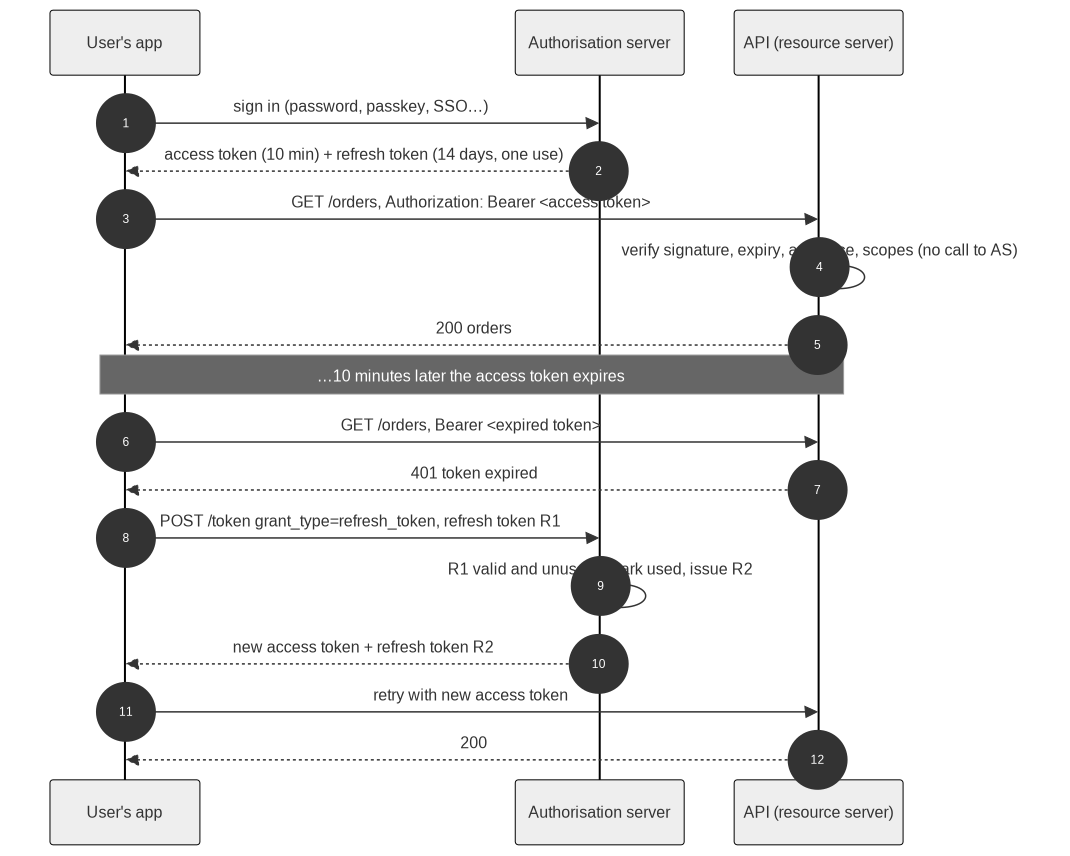
Diagram source
sequenceDiagram
  autonumber
  participant U as User's app
  participant AS as Authorisation server
  participant API as API (resource server)
  U->>AS: sign in (password, passkey, SSO…)
  AS-->>U: access token (10 min) + refresh token (14 days, one use)
  U->>API: GET /orders, Authorization: Bearer <access token>
  API->>API: verify signature, expiry, audience, scopes (no call to AS)
  API-->>U: 200 orders
  Note over U,API: …10 minutes later the access token expires
  U->>API: GET /orders, Bearer <expired token>
  API-->>U: 401 token expired
  U->>AS: POST /token grant_type=refresh_token, refresh token R1
  AS->>AS: R1 valid and unused? mark used, issue R2
  AS-->>U: new access token + refresh token R2
  U->>API: retry with new access token
  API-->>U: 200
The first clue is what doesn’t happen. The API never talks to the authorisation server per request: it checks the access token’s signature with the server’s public key. That’s why access tokens are fast, and also why they can’t easily be revoked: nobody asks. It’s a good trade, and a quietly elegant one: the API stays stateless and quick, and the short expiry pays for the missing revocation.
Two suspects, side by side #
| Access token | Refresh token | |
|---|---|---|
| Sent to | Every API, on every request | Only the authorisation server’s token endpoint |
| Lifetime | 5-15 minutes | Hours to weeks; often also an absolute maximum (e.g. 30 days) |
| Format | Often a signed JWT (self-contained) | Opaque random string, looked up in a database |
| Checked by | The API, locally | The authorisation server, against its database |
| Revocable | Not easily (it expires on its own) | Yes, immediately |
| Rotation | No | Yes: each use returns a new one and invalidates the old |
| If stolen | Usable until it expires, for its scopes | Usable once, then detected (with rotation and reuse detection) |
The crime: what happens when one leaks #
This is where the two-token split earns its keep. Each kind of leak plays out differently, and the differences are the whole point.
Case one: a stolen access token #
An attacker who captures an access token (from a log, a proxy, a compromised browser extension) can call the APIs it’s valid for until it expires. What boxes them in:
- Short lifetime: minutes, not days.
- Audience and scopes: a token for the orders API with
orders:readcan’t call payments or change anything. - Sender-constrained tokens (DPoP or mutual TLS) bind the token to a key the client holds, so a copied token is useless without the key. Worth it for high-value APIs.
Case two: a stolen refresh token, with rotation and reuse detection #
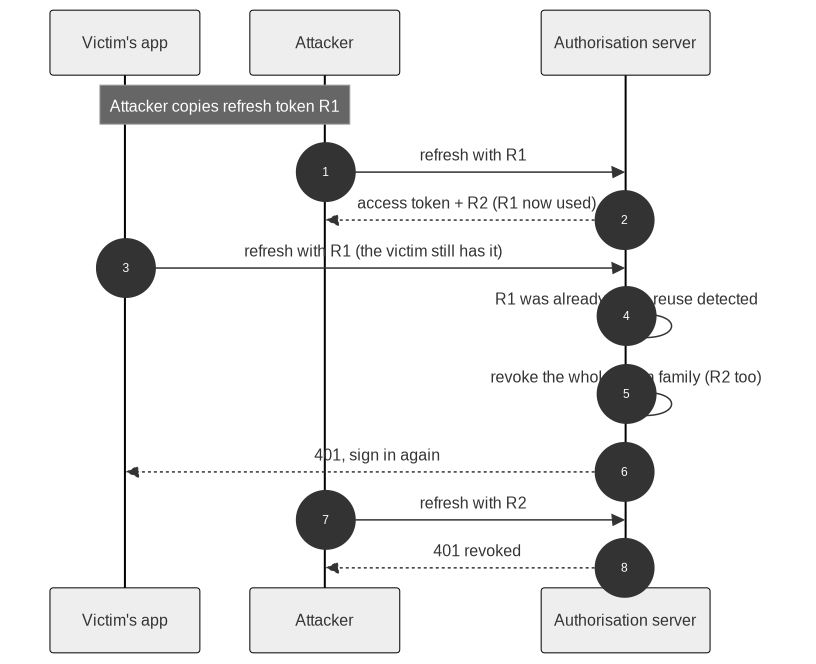
Diagram source
sequenceDiagram
  autonumber
  participant V as Victim's app
  participant X as Attacker
  participant AS as Authorisation server
  Note over V,X: Attacker copies refresh token R1
  X->>AS: refresh with R1
  AS-->>X: access token + R2 (R1 now used)
  V->>AS: refresh with R1 (the victim still has it)
  AS->>AS: R1 was already used: reuse detected
  AS->>AS: revoke the whole token family (R2 too)
  AS-->>V: 401, sign in again
  X->>AS: refresh with R2
  AS-->>X: 401 revoked
This is the moment to pause and admire. The server never needs to work out who the attacker is. It only needs to notice that a token meant to be used once has been used twice. Whichever side presents the stolen token second trips the alarm, and the entire chain is revoked. The attacker walks away with at most one access token, good for minutes. Without rotation, the story ends very differently: a stolen refresh token works silently until it expires, and nobody ever knows.
Case three: both stolen at once (a compromised device) #
Every good mystery has a case the detective can’t close, and this is it. If malware controls the device, it can take everything, including future tokens. Tokens can’t fix that. What limits the damage: an absolute session lifetime, re-authentication for sensitive actions (changing email, payouts), device binding (passkeys, DPoP), and users being able to see and end their sessions.
The hiding place #
Good token design can be undone by a bad hiding place, so storage deserves as much care as lifetimes.
| Client | Access token | Refresh token | Why |
|---|---|---|---|
| Server-rendered web app | On the server | On the server | The browser only gets an HttpOnly, Secure, SameSite session cookie; nothing for JavaScript to steal |
| Single-page app (recommended) | On a backend-for-frontend (BFF) | On the BFF | The SPA talks to its own backend with a cookie; the BFF holds the tokens and calls APIs |
| Single-page app, no backend | In memory (a JavaScript variable) | In memory, or not at all (silent re-auth) | Never localStorage: any XSS can read it. Memory is lost on reload, which is the trade-off |
| Mobile app | In memory | iOS Keychain / Android Keystore | OS-protected storage, optionally behind biometrics |
| Server-to-server | In memory, cached until expiry | None: use client credentials to get a new access token (see the OAuth flows post) | No user, so nothing to refresh |
The obvious suspect here is localStorage, and it’s guilty. Any script running on your page (an XSS bug, a compromised npm dependency, a third-party widget) can read it and send it anywhere. An HttpOnly cookie can’t be read by script. XSS can still use the session while the page is open, but it can’t carry the credential away. Cookies do bring CSRF back into play, which is its own case, worked through in the CSRF, CORS and SameSite post.
Remember this
- Access token: shown everywhere, so it dies in minutes.
- Refresh token: shown only to the auth server, rotated, so a reused one kills the session.
- Keep tokens away from browser JavaScript: never
localStorage.
What to do on Monday #
- Access tokens: 10 minutes, audience-restricted, minimal scopes, signed with asymmetric keys (APIs only need the public key).
- Refresh tokens: opaque, stored hashed on the server, rotated on every use with reuse detection, an idle timeout (e.g. 14 days) and an absolute lifetime (e.g. 30-90 days).
- Web: a BFF or server-side sessions; tokens never reach browser JavaScript.
- Mobile: refresh token in the Keychain/Keystore; access token in memory.
- Users can see and revoke sessions; password change and “sign out everywhere” revoke all refresh tokens.
One last twist: many products don’t need tokens at all. A first-party web app with its own backend is simpler and safer with server-side sessions, as the sessions or JWTs post explains, and that’s the case to read next.
Either way, the two-token pattern is worth understanding. It’s an honest admission that credentials leak, paired with a design that makes each leak short, narrow and noisy.
Comments
No comments yet.
Sign in to comment. We'll email you a link; no password needed.