How should you store passwords?
With a slow, memory-hard password hash (argon2id, or scrypt or bcrypt), a unique salt per password, and settings that make each guess cost tens of milliseconds. A fast hash like SHA-256 lets a GPU try billions of guesses a second. Plus the parts around the hash that matter as much: rate limits…
Short answer: the verdict, as we’ll prove: never store the password, and never store a fast hash of it.
- Use argon2id (a variant of Argon2, the winner of the Password Hashing Competition; recommended by OWASP), or scrypt or bcrypt if that’s what your platform has.
- A unique random salt per password (the libraries do this for you) so identical passwords hash differently and precomputed tables are useless.
- Tune the cost so one hash takes tens of milliseconds on your servers: slow enough to make guessing expensive, fast enough for logins.
- Store the parameters with the hash (the standard encoded format does), so you can raise them later and rehash at the next login.
Every password case begins the same way: the database has been stolen. The attacker has every row, all the time in the world, and a GPU. What you stored decides whether they walk away with a list of hashes or a list of passwords. There’s a lovely inversion at the heart of this case: almost everywhere else in engineering we chase speed, and here the whole point is to be deliberately, carefully slow. Let’s see why that works so well.
Case file
The case The database has been stolen: the attacker has every row, time and a GPU Suspects Plain text, encryption, MD5 / SHA-1 / SHA-256 (even salted) Culprit A fast hash: billions of guesses per second per GPU The fix argon2id with a unique salt, tuned to tens of milliseconds, parameters stored with the hash Evidence The blogging platform I run: 64 MiB, 3 iterations, parallelism 2 and at most 4 hashes at once
The suspects: why fast hashes fail #
An attacker who steals your database tries common passwords against every hash. With SHA-256, a single modern GPU computes billions of hashes per second: most human-chosen passwords fall within hours. With argon2id at 64 MiB and three passes, each guess needs 64 MiB of memory and real time, so the same GPU manages only a tiny fraction of that, and the memory requirement stops cheap parallel hardware from catching up. That’s the elegant part of the reveal. Memory-hard hashing attacks the attacker’s economics: memory is far harder to scale up cheaply than raw arithmetic.
| Method | Speed for an attacker | Verdict |
|---|---|---|
| Plain text | Instant | Never |
| Encryption (AES) | Instant once the key leaks, and it usually leaks with the data | Never for passwords |
| MD5 / SHA-1 / SHA-256, even salted | Billions per second per GPU | Never for passwords |
| bcrypt (cost 12+) | Slow; limited memory use | Acceptable; note the 72-byte input limit |
| scrypt | Slow and memory-hard | Good |
| argon2id | Slow and memory-hard, tunable | Best default |
Two rows are tempting false leads. Encryption sounds safer than hashing, but the key usually leaks with the data. A salted SHA-256 sounds careful, but salting doesn’t slow a GPU down.
The settings #
OWASP’s guidance for argon2id (Password Storage Cheat Sheet, as of Nov 2026) starts at 19 MiB of memory, 2 iterations, 1 degree of parallelism, and allows trading memory for iterations. Raise them as far as your login latency and memory budget allow.
The blogging platform I run uses 64 MiB, 3 iterations, parallelism 2, and limits how many hashes run at once (4), so a burst of logins can’t exhaust memory: a request waits briefly for a slot and otherwise gets “busy, try again” instead of taking the server down. A slow hash is a strength until a crowd arrives; the limit keeps it from becoming your own denial of service.
The clues around the hash #
The hash gets the attention, but the login flow around it is where a lot of thoughtful defence lives.
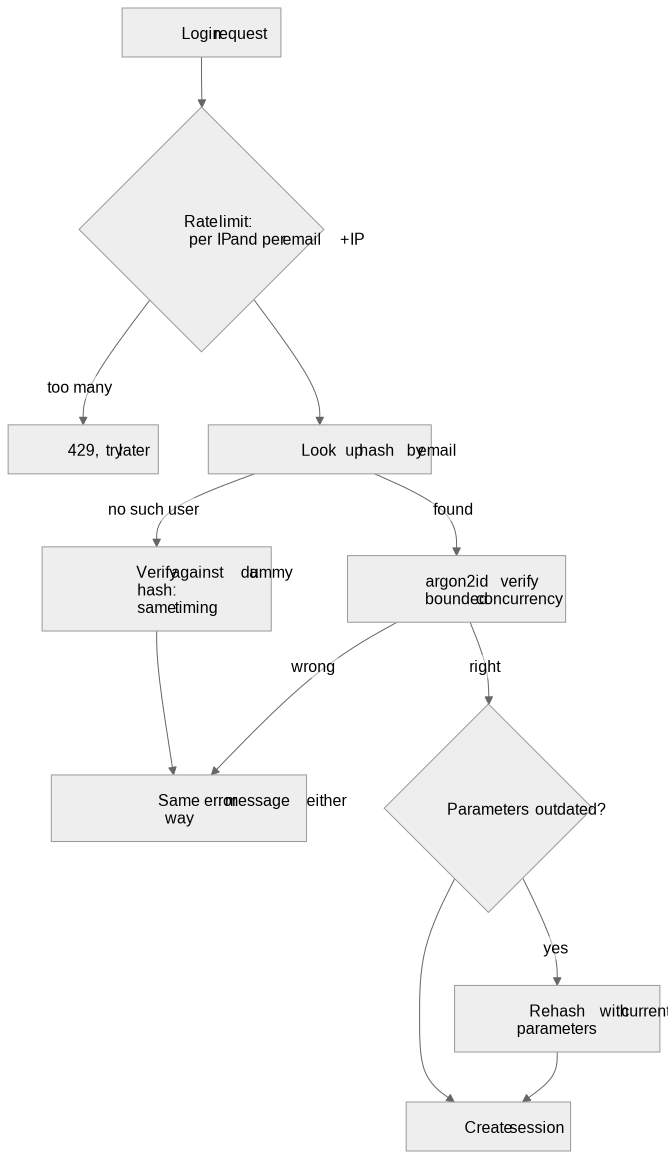
Diagram source
flowchart TD
  L[Login request] --> RL{Rate limit:<br/>per IP and per email + IP}
  RL -->|too many| B[429, try later]
  RL --> LK[Look up hash by email]
  LK -->|no such user| D[Verify against a dummy hash:<br/>same timing]
  LK -->|found| V[argon2id verify<br/>bounded concurrency]
  D --> F[Same error message either way]
  V -->|wrong| F
  V -->|right| UP{Parameters outdated?}
  UP -->|yes| RH[Rehash with current parameters]
  UP --> S[Create session]
  RH --> S
- Rate limits per IP and per email-and-IP (rate-limiting post): per-email alone lets an attacker lock a known user out from anywhere.
- Same answer, same timing for “no such user” and “wrong password”: verify against a dummy hash when the user doesn’t exist. Otherwise the response time itself becomes a witness.
- Breached passwords: at sign-up and password change, check the password against known breach lists (the Have I Been Pwned range API sends only the first 5 characters of a SHA-1 hash, so the password never leaves your server). I think that range API is one of the best privacy designs on the web: you learn whether a password is breached without telling anyone what it is.
- Length rules, not composition rules: at least 12 characters (the blogging platform requires 12), allow long passphrases and every character, and drop “must contain a symbol” rules, which mostly produce
Password1!. - Upgrade old hashes at login: when a user signs in with a hash made with old parameters or an old algorithm, rehash with the current settings. For legacy MD5 or SHA-1 hashes, wrap them now (
argon2id(old_hash)) instead of waiting for every user to log in. - Pepper (optional): a secret key, stored outside the database, mixed in (for example as an HMAC before hashing). A database-only leak then can’t be cracked offline without it; but rotating the pepper means rehashing, so plan for versions.
The best ending: nothing to steal #
The safest password is the one you never store: passkeys, magic links or SSO shift the problem away from you (sign-up strategies post). Where you do keep passwords, add 2FA (which 2FA post).
Remember this
- Here slow is the point: a memory-hard hash makes every guess expensive.
- Same answer and same timing for a missing user and a wrong password.
- Bound hashing concurrency, and rehash at login when parameters change.
Case closed: what I’d do by default #
- argon2id, tuned to tens of milliseconds, parameters stored with each hash.
- Bounded hashing concurrency so logins can’t exhaust memory.
- Rate limits, constant-time failure paths and identical errors.
- Breached-password checks and a 12-character minimum, no composition rules.
- Rehash on login whenever parameters change.
It’s worth appreciating how much care sits behind that one login box: salts, memory-hard maths, matched timings and patient upgrades, all so a stolen database is worth as little as possible.
Comments
No comments yet.
Sign in to comment. We'll email you a link; no password needed.