Clean, hexagonal or layered architecture: does the shape matter?
They share one idea: business rules shouldn't depend on frameworks, databases or vendors. Layered is the simplest, hexagonal makes swapping and testing easy, clean architecture adds more rings, and vertical slices organise by feature instead. How to choose for the size of your system.
The verdict, which the cases below will earn: the shape matters less than the direction of dependencies.
- All of these styles say the same core thing: business rules shouldn’t depend on the web framework, the database or a vendor. Details depend on the core, not the other way round.
- Layered (handlers → services → data access) is enough for most CRUD-heavy services.
- Hexagonal (ports and adapters) is worth it when you have real integrations to swap or test around.
- Clean architecture adds more named rings; useful vocabulary, often too many folders for a small service.
- Vertical slices organise by feature rather than by layer, and suit apps with many independent features.
The case usually arrives as an argument in a design review: three diagrams, three camps, and a growing pile of folders. The usual suspect is the shape itself, as if picking the right picture would make the code good. But underneath the diagrams and the arguments sits one good idea. Alistair Cockburn’s ports and adapters and Robert C. Martin’s clean architecture are two ways of saying it, and once you see the shared idea, choosing a shape gets much less stressful.
Case file
The case Three diagrams, three camps, a growing pile of folders Suspects The shape itself: layered, hexagonal, clean, vertical slices Culprit Which way the dependencies point The fix Business rules depend on nothing: details depend on the core
The lineup #
| Layered | Hexagonal (ports and adapters) | Clean architecture | Vertical slices | |
|---|---|---|---|---|
| Organised by | Technical layer | Core vs adapters | Concentric rings (entities, use cases, adapters, frameworks) | Feature |
| Dependencies point | Downward (often to the database) | Inward, to ports the core owns | Inward | Within each slice; shared bits kept minimal |
| Testing the core | Often needs a database or mocks of it | Fakes for each port | Fakes for each boundary | Per feature, often with a real database |
| Ceremony | Low | Medium | High | Low to medium |
| Fits | CRUD services, small teams | Services with several integrations | Large, long-lived systems with complex rules | Apps with many mostly independent features |
The table makes them look like rivals. In practice they’re tools for different situations, and the cases below show which one fits where.
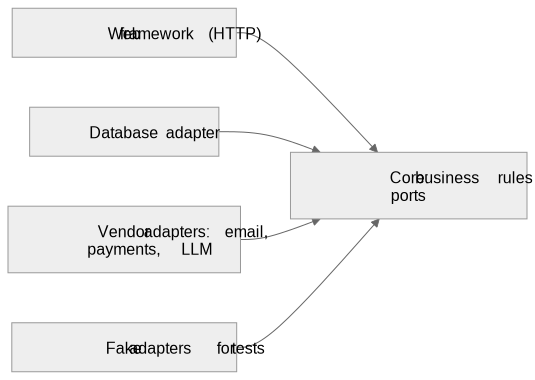
Diagram source
flowchart LR
  W["Web framework (HTTP)"] --> C["Core: business rules and ports"]
  D["Database adapter"] --> C
  V["Vendor adapters: email, payments, LLM"] --> C
  F["Fake adapters for tests"] --> C
Case 1: testing without a database (or deciding not to) #
Situation: you want fast tests for business rules.
Option A, hexagonal: the core depends on a PostRepository port; tests use an in-memory fake. Tests are fast, but the fake can drift from the real database, and none of the SQL is tested. That’s the tempting lead, and here it points the wrong way.
Option B, test against the real database: The blogging platform I run does this. Its tests run against PostgreSQL in Docker, because much of what matters lives in the database: row-level security (the tenant isolation post), constraints, definer functions. A fake would skip exactly the parts most likely to be wrong. The suite still runs in seconds.
What I’d do: if your rules live in code, use ports and fakes for the core and a few integration tests for the adapters. If your rules live partly in the database (constraints, RLS, triggers), test against the real database and don’t invent a port just to avoid it.
Case 2: replacing a vendor #
Situation: you use one email provider, one payment provider and one LLM API. Any of them might change on price or reliability.
What I’d use: hexagonal thinking at those edges, even in a layered app. This is where the idea shines brightest, and it’s a lovely move: you describe what you need in your own words, and the vendor becomes a detail.
- Define a port in your own terms:
Sender.Send(email),Payments.Charge(...),Extractor.Extract(document). - Write one adapter per vendor (the design patterns post shows the adapter pattern at work). Keep vendor types out of the core.
- Add a fake adapter for tests and local development.
The blogging platform does this for email only. The document ingestion lab does it for the extraction model, so a cheaper model or a rules-based extractor can be swapped in and compared on the same documents.
Case 3: a small API #
Situation: a service with a dozen endpoints over a handful of tables.
What I’d use: simple layering, three packages at most.
web/    HTTP: parse, authorise, call the store, render
store/  SQL, one function per query
domain/ (optional) pure rules that don't fit in either
The blogging platform is roughly this, without a separate domain package: handlers in web, all SQL in store, templates beside the handlers. Adding usecases/, entities/, gateways/, presenters/ and controllers/ for this size would mean five files per feature and no new guarantees. More folders here would be a false lead: they look like rigour, and buy nothing.
What clean architecture adds #
Clean architecture deserves credit for naming things that were easy to feel and hard to say. Its useful contributions, beyond hexagonal:
- Use cases as first-class units: one object or function per application action (
PublishPost,ConfirmOrder), which makes the list of things the system does visible. - Strict rings: entities know nothing about use cases; use cases know nothing about HTTP.
These help a large codebase with several teams and complex rules. In a small service, they mostly add mapping code between nearly identical structures.
Vertical slices #
Instead of controllers/, services/ and repositories/ folders, each feature gets its own folder with its handler, logic and queries. It works well when features are independent (an admin area, a reporting module, a webhook receiver). It needs discipline so that shared code doesn’t get copied around. Many codebases combine it with hexagonal ports at the external edges.
Remember this
- The shape matters less than the direction of dependencies.
- Put a port in front of each external vendor from the start.
- If rules live in the database, test against the real database.
The reveal, and what to do on Monday #
The culprit was never the shape. It was always which way the arrows point. Get that right and the rest is a matter of taste and size:
- Start layered, with dependencies pointing away from HTTP and toward rules.
- Put a port in front of each external vendor from the start; it’s cheap.
- Test against the real database when rules live in it.
- Move to hexagonal or clean architecture when the core rules grow complex enough that you want them isolated and tested alone.
- Consider vertical slices when the app becomes many independent features.
The nice thing is that you don’t have to pick a shape forever. Keep the dependencies pointing at your rules, and every one of these styles stays within easy reach as the system grows. For the next case, the design patterns post shows the adapter at work.
Comments
No comments yet.
Sign in to comment. We'll email you a link; no password needed.