What's the cheapest disaster recovery that actually works?
Backups you've never restored are a hope. Two numbers decide a disaster-recovery plan: how much data you can lose (RPO) and how long you can be down (RTO). Measured on a 1 GB PostgreSQL database: a nightly dump vs continuous WAL archiving, with the server and its disk deleted mid-write.
The verdict, which we’ll earn by breaking things on purpose: decide two numbers first:
- RPO (recovery point objective): how much recent data you can afford to lose.
- RTO (recovery time objective): how long you can afford to be down.
Then buy the cheapest setup that meets both, and restore from it on a schedule, because a backup you haven’t restored is a hope, not a backup. For most small and mid-sized SaaS products, the cheapest setup that actually works is:
- continuous archiving of the database’s write-ahead log, plus periodic base backups, to object storage in another region or account;
- infrastructure defined in code, so a new server is a command, not a weekend;
- a monthly restore drill.
Standby replicas and multi-region setups cost much more, and are for RTOs measured in seconds.
Every disaster-recovery story has the same tense opening: the server is gone, the disk is gone, and everyone turns to the backups and hopes. There’s a particular kind of calm that comes from knowing you can rebuild everything from scratch, and I think it’s one of the nicest feelings in operations. The surprising twist is how little it costs.
I measured the two cheapest options on a 1 GB PostgreSQL 17 database. The code is in database-tradeoffs-lab (make dr). The drill kills the server and deletes its disk while writes are running, then rebuilds from what survived.
Case file
The case The server and its disk are gone, and everyone turns to the backups Suspects A nightly dump, replicas Culprit Backups that were never restored, and an RPO of “since the last dump” The fix WAL archiving + base backups off-site, infrastructure as code, a monthly restore drill Evidence A 1 GB PostgreSQL 17 database, server killed and disk deleted mid-write, make dr
The suspects, cheapest first #
| Strategy | What runs all the time | Data you can lose (RPO) | Time to recover (RTO) | Relative cost |
|---|---|---|---|---|
Nightly logical dump (pg_dump) to object storage |
A cron job | Up to a day | Restore time + rebuilding the server | Lowest: storage only |
| Base backups + continuous WAL archiving (PITR) | WAL shipped to object storage as it’s written | Seconds to a minute | Copy the backup + replay WAL + rebuild the server | Low: storage + a little bandwidth |
| Pilot light | Data replicated to another region; servers defined in code but not running | Seconds to minutes | Start the servers, point traffic at them | Low to medium |
| Warm standby | A streaming replica (and a smaller copy of the app) ready to take over | ~0 to seconds | Minutes: promote and switch traffic | Medium: a second database running 24/7 |
| Multi-site active/active | Full capacity in two places, both serving | ~0 | ~0 (traffic shifts) | Highest: everything twice, plus multi-writer complexity |
These are the patterns AWS names in its disaster-recovery guidance: backup and restore, pilot light, warm standby, and multi-site active/active. They apply on any provider.
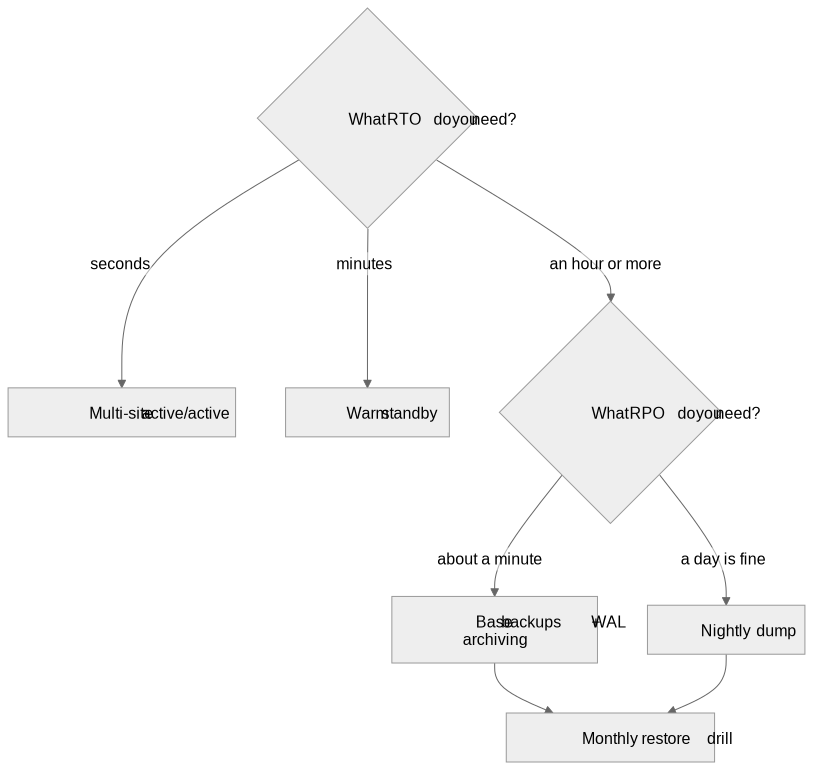
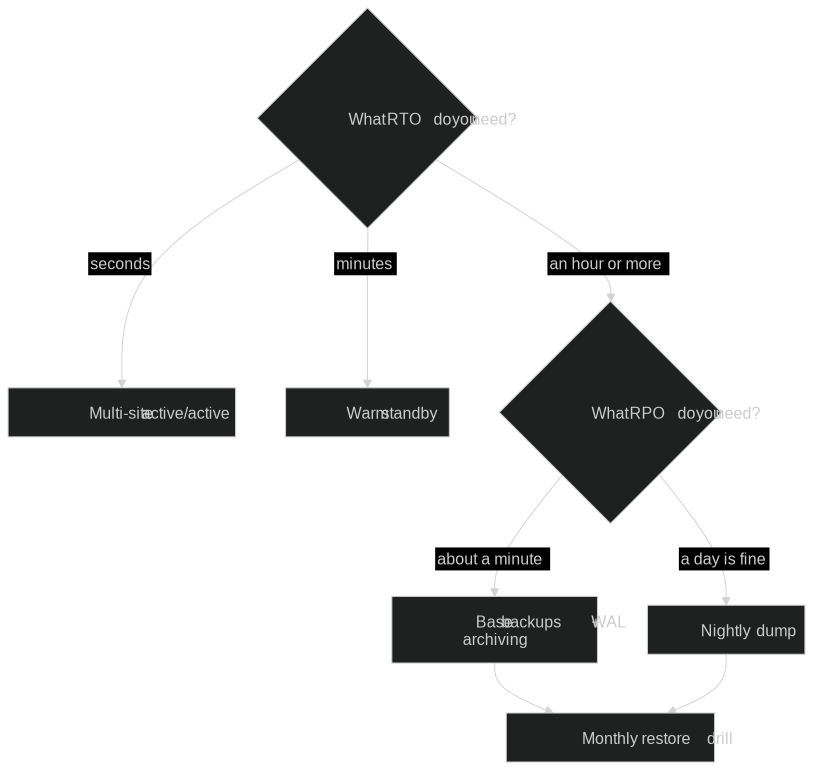
Diagram source
flowchart TD
  A{"What RTO do you need?"} -->|seconds| B["Multi-site active/active"]
  A -->|minutes| C["Warm standby"]
  A -->|an hour or more| D{"What RPO do you need?"}
  D -->|about a minute| E["Base backups + WAL archiving"]
  D -->|a day is fine| F["Nightly dump"]
  E --> G["Monthly restore drill"]
  F --> G
The staged disaster: what the two cheapest options actually save #
Now a real disaster, staged so we can watch it closely.
The database: 6 million orders, 1.08 GB, with realistic, incompressible text. (An early red herring: my first run used repeated filler that compressed to almost nothing, and gave a misleadingly tiny dump.) The primary archived every WAL segment, with archive_timeout = 10s.
| Backup | Took | Size | Restore |
|---|---|---|---|
Logical: pg_dump -Fc |
36 s | 364 MB | pg_restore -j 4 into a fresh server: 26 s |
Physical: pg_basebackup |
4.3 s | 1.1 GB | Part of the recovery below |
The disaster: after the base backup, a session committed one row every 100 ms for 45 s. Then the server was killed and its data volume deleted. Only the backups and the WAL archive survived.
| Recover from | Data lost (RPO) | Time to a working primary (RTO) |
|---|---|---|
| The logical dump | Everything since the dump: here all 450 new rows, and the table they were in | The 26 s restore, plus rebuilding and redeploying |
| Base backup + archived WAL | The last 7.8 seconds (75 rows) | 5.6 s from the disaster |
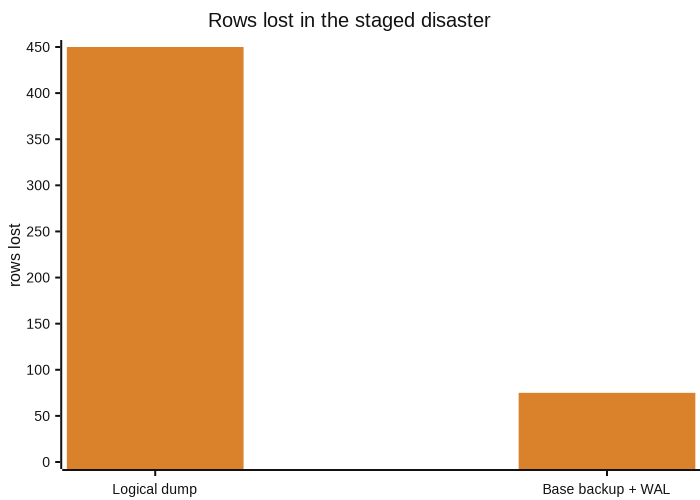
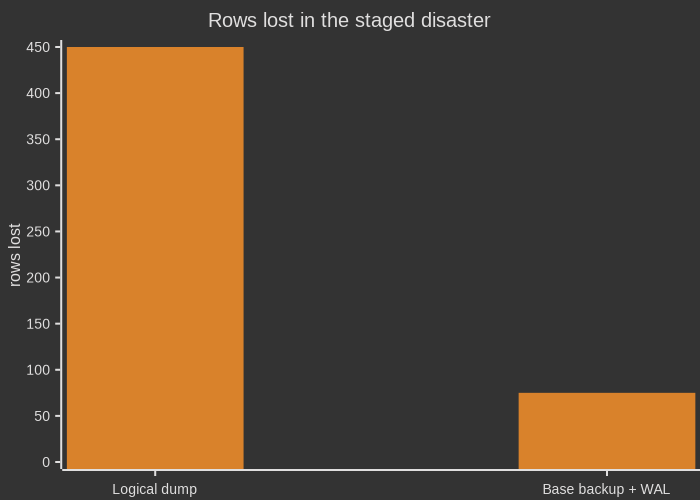
Diagram source
xychart-beta
  title "Rows lost in the staged disaster"
  x-axis ["Logical dump", "Base backup + WAL"]
  y-axis "rows lost" 0 --> 450
  bar [450 , 75]
Two clues to read from this:
- The dump’s real RPO isn’t “a few seconds”, it’s “since the last dump”. Nightly means up to 24 hours of orders, sign-ups and payments gone. It’s also slower to restore than to take: a logical restore rebuilds every index.
- WAL archiving lost only what hadn’t been shipped yet. Here’s the elegant part: the same log the database already writes for itself (the append-only log post) becomes your backup, almost for free. That’s bounded by
archive_timeout: 10 s here, 60 s is common. Recovery was a file copy plus WAL replay. On a real system, add the time to download the backup from object storage and to provision a server. Both scale with size and are the reason to practise.
Production setups use a tool rather than cp: pgBackRest or WAL-G add compression, encryption, parallel transfer, retention and checksums. On RDS and Aurora, automated backups and point-in-time restore are built in (the self-host or RDS post weighs that up). You still choose the retention and the target region, and you still need to rehearse a restore.
Case 1: a single-VM SaaS #
Situation: one small VM running the app and PostgreSQL. This is how the blogging platform I run is deployed: about €5 a month for the VM (Nov 2026).
What it does today:
- a nightly
pg_dump, encrypted with restic and stored off-site in S3-compatible storage; - retention of 14 daily, 8 weekly and 12 monthly backups;
- a monthly restore drill script that restores the latest backup into a throwaway database and checks row counts.
That’s an RPO of up to 24 hours, an RTO of “an hour or two, by hand”, and a cost of a few cents of storage a month. For an early product that’s a reasonable trade, because the drill exists.
The next step, when a day of data matters: add WAL archiving to the same bucket (WAL-G or pgBackRest). The RPO drops from a day to about a minute for almost no extra cost.
Case 2: a regional outage #
Situation: the whole region (or the cloud account) is unavailable for hours.
Backups in the same region are no alibi here. You need:
- backups and WAL in another region, ideally in another account, so a compromised account can’t delete them too;
- infrastructure as code, so the stack can be created there from scratch: network, servers, DNS, secrets;
- a decision rule: at what outage length do you fail over, and who decides?
That’s the pilot-light pattern: data already there, compute created on demand. The RTO is how long your infrastructure code takes to apply plus the restore, so measure it in a drill.
Case 3: ransomware or a destructive mistake #
Situation: an attacker, a bad migration or a mistaken DELETE destroys data, and replication faithfully copies the destruction to every replica within milliseconds.
Replicas are not backups. This is the most convincing false lead in the whole field. Replication does its job perfectly here, and that’s exactly the problem. Defences:
- Point-in-time recovery to just before the damage: WAL archiving lets you pick the moment.
- Immutable or delayed copies: object storage with versioning and object lock (write-once retention), or a delayed replica (
recovery_min_apply_delay). - Separate credentials: the application’s credentials must not be able to delete backups.
What usually breaks in a real recovery #
The drill is where you find these, gently, instead of during the real thing.
- The backup was never restored, and doesn’t work: wrong format, missing roles, an extension that isn’t installed. The drill catches these.
- The encryption key or password is only on the server that died. Keep it in a password manager too.
- The backups are in the same account or region as the disaster.
- Nobody knows the steps: write a runbook while it’s calm, and time each step during the drill.
- Everything else around the database: secrets, DNS, TLS certificates, object storage with user uploads, and the configuration of every service. Back them up, or have code that recreates them.
Remember this
- Decide RPO and RTO first, then buy the cheapest setup that meets both.
- Replicas are not backups: they copy the destruction too.
- A backup you haven’t restored is a hope: the drill time is your real RTO.
What to do on Monday #
- Write down RPO and RTO per system, with the business: “we can lose at most a minute of orders, and be down at most an hour.”
- WAL archiving + nightly base backups to object storage in another region and account, with versioning and object lock. It’s cheap and it meets a one-minute RPO.
- Infrastructure as code for everything needed to stand the system up again.
- A scheduled restore drill that restores into a fresh environment, checks the data, and records how long it took. That time is your real RTO.
- Add a warm standby only when the RTO demands minutes, and multi-site only when it demands seconds and the business will pay for twice the infrastructure.
That’s the reveal of this case: the cheapest recovery that works isn’t a product, it’s a habit. It turns disaster recovery from an act of faith into a routine you’ve already rehearsed. A few cents of storage and a monthly drill buy you a lot of sleep.
Measured Nov 2026 on PostgreSQL 17.11 in Docker on one laptop (NVMe SSD); backups and archive on local volumes, so real recoveries add download and provisioning time. AWS disaster-recovery pattern names from AWS’s public guidance. Code and full results: database-tradeoffs-lab/15-backup-restore.
Comments
No comments yet.
Sign in to comment. We'll email you a link; no password needed.