Lambda, Fargate or EC2: how do you decide on cost?
You pay Lambda per request and per millisecond, Fargate per second of reserved vCPU and memory, and EC2 per instance-hour whether busy or not. The cheapest choice depends on utilisation: spiky and idle favours Lambda, steady and busy favours EC2, and the crossover is worth calculating for your own…
The verdict, which the arithmetic below will earn: it depends on utilisation, how much of the time your compute is busy.
- Lambda charges per request and per millisecond of execution, so an idle function costs nothing. It’s the cheapest for spiky or low-volume work.
- EC2 charges per instance-hour whether the instance is busy or idle, but each hour of compute is the cheapest of the three. It wins for steady, high utilisation.
- Fargate sits in between: you pay per second for the vCPU and memory you reserve for each task, with no servers to manage.
Somewhere along the utilisation curve the lines cross. Find that point for your workload with the AWS Pricing Calculator and current regional prices, rather than a rule of thumb.
Prices aren’t quoted here, because they differ by region and change. The cost structure is stable, and that’s what decides the choice.
The case usually arrives as a bill that seems too big for the traffic, and a team split into camps: “serverless is always cheaper” versus “just run a box”. I enjoy this question because it rewards a little arithmetic over a lot of opinion. Once you see that each service is a different way of charging for the same thing, idle time, the culprit is unmasked: the answer stops being a debate and becomes a graph you can draw.
Case file
The case A bill that seems too big for the traffic Suspects “Serverless is always cheaper” vs “just run a box” Culprit Paying for idle time, in a different way on each service The fix Find the utilisation crossover: Lambda for spiky, EC2 for steady, Fargate between Evidence CapGrid: 5,000-10,000 requests per second on always-on compute
The suspects and how each one charges #
Three pricing models, three different bets on how busy you’ll be.
| Lambda | Fargate | EC2 | |
|---|---|---|---|
| You pay for | Each request, plus duration × memory configured (GB-seconds) | vCPU and memory reserved per task, per second while it runs | The instance, per hour (or second), busy or idle |
| Idle cost | Zero (unless you use provisioned concurrency) | The tasks you keep running | The instances you keep running |
| Unit cost of compute | Highest | Middle | Lowest, and lower still with Savings Plans, Reserved Instances or Spot |
| Limits | Up to 15 minutes per invocation, up to 10 GB of memory (as of Nov 2026); cold starts | Task sizes from fractions of a vCPU upwards | Anything an instance type offers |
| Ops cost | Lowest | Low | Highest: patching, AMIs, scaling configuration |
| Discounts | Compute Savings Plans | Compute Savings Plans; Fargate Spot | Savings Plans, Reserved Instances, Spot |
Case 1: a spiky webhook handler #
Situation: a partner sends webhooks in bursts: thousands in a few minutes, then nothing for hours.
What I’d use: Lambda, ideally with SQS in front (API Gateway or a function URL → SQS → Lambda), so bursts queue up instead of overwhelming downstream systems: the queue turns a stampede into an orderly line, which is a lovely bit of design for one extra hop. You pay only for the seconds of work, and nothing overnight. Watch two things:
- Cold starts: usually fine for asynchronous work. For user-facing latency, keep functions small, or use provisioned concurrency, which brings back an idle cost.
- Downstream connections: hundreds of concurrent functions can exhaust a database. Use RDS Proxy, or limit concurrency.
Case 2: a steady API serving traffic all day #
Situation: an API with a predictable daily curve that never drops near zero.
What I’d use: containers on ECS (Fargate for simplicity, EC2 for the lowest unit cost), or EC2 Auto Scaling groups, plus a Savings Plan for the always-on baseline. Here the “serverless is always cheaper” theory turns out to be a false lead: at steady utilisation, per-request pricing costs more than paying for capacity you keep busy. The Kubernetes post compares the ways to run those containers. Right-size the baseline from real metrics (CPU, memory, p99 latency), and let auto scaling handle the peaks.
The platform I run at CapGrid serves 5,000-10,000 requests per second, steady enough that always-on compute is the economical base, with Lambda and SQS handling the asynchronous and bursty parts.
Case 3: a nightly batch job #
Situation: a report or data job that runs for 40 minutes every night.
What I’d use:
- Fargate, started by EventBridge Scheduler: pay for 40 minutes, nothing the rest of the day, and no 15-minute limit.
- Two newer Lambda options (re:Invent 2025) blur the line. Lambda Managed Instances runs functions on EC2 capacity in your account, billed per instance rather than per request, with runs of up to 90 minutes (since Sept 2026). Durable functions checkpoint a multi-step workflow so it can wait for hours or days without paying for idle time. Worth a look if you’d rather stay in Lambda; for one plain 40-minute batch job, Fargate is still the simpler choice.
- Lambda if the job can be split into pieces that each finish within its limit (often a good design anyway: restartable, parallel).
- EC2 Spot for large or long jobs that tolerate interruption: the cheapest compute on AWS, if the job can checkpoint and resume.
The one option to rule out: an always-on instance that sits idle 23 hours a day.
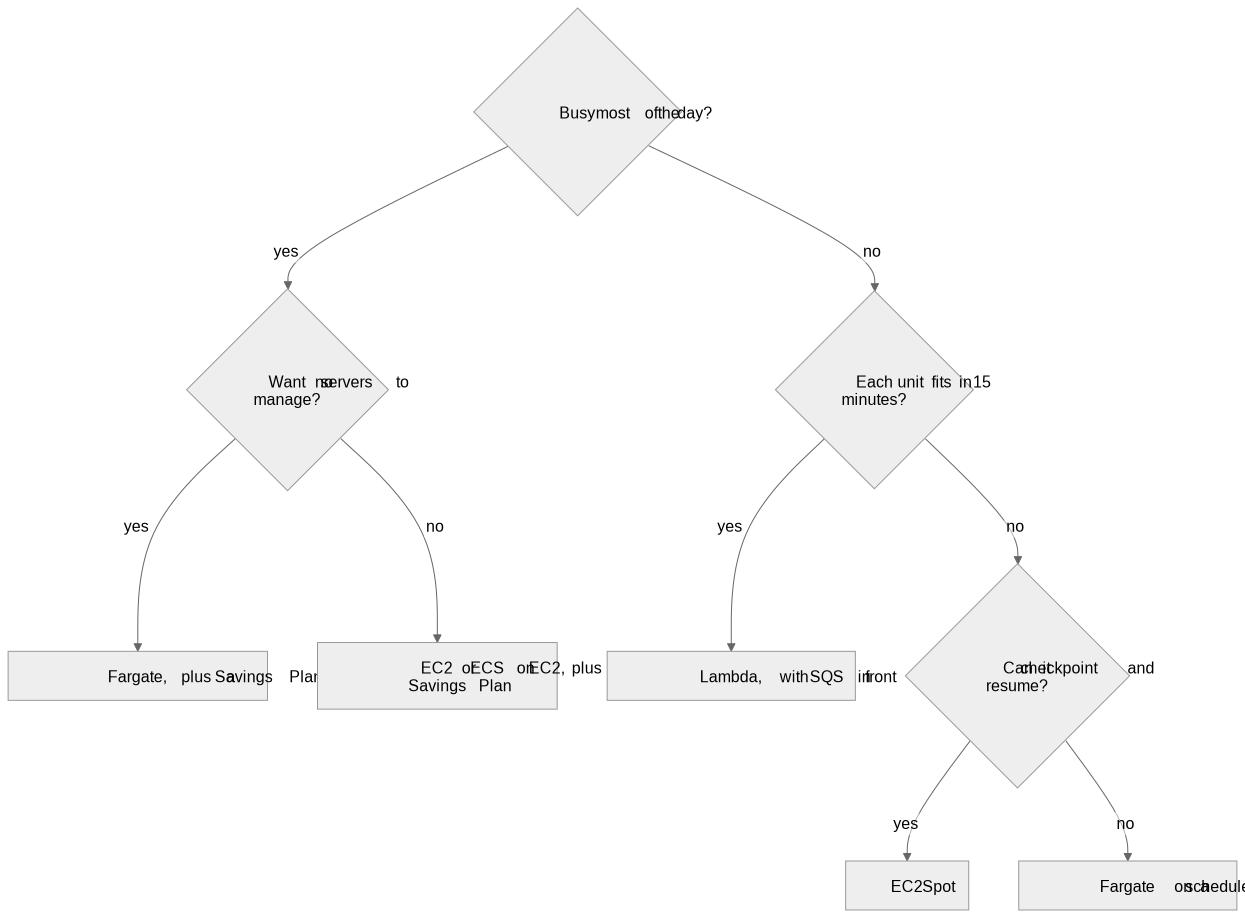
Diagram source
flowchart TD
  Q1{"Busy most of the day?"} -- yes --> Q2{"Want no servers to manage?"}
  Q2 -- yes --> F["Fargate, plus a Savings Plan"]
  Q2 -- no --> E["EC2 or ECS on EC2, plus a Savings Plan"]
  Q1 -- no --> Q3{"Each unit fits in 15 minutes?"}
  Q3 -- yes --> L["Lambda, with SQS in front"]
  Q3 -- no --> Q4{"Can it checkpoint and resume?"}
  Q4 -- yes --> S["EC2 Spot"]
  Q4 -- no --> FS["Fargate on a schedule"]
The reveal: finding your crossover #
This is the part I find most satisfying. A few lines of arithmetic settle what could otherwise be a long argument. For a given workload:
- Measure the work: average and peak requests per second, the duration of each request, and memory needed.
- Lambda cost ≈ requests × (request price + duration × memory × GB-second price).
- Fargate cost ≈ the tasks needed at each hour × (vCPU + memory) × hourly rates.
- EC2 cost ≈ instances needed at each hour × the instance price, minus your Savings Plan discount.
- Add what the bill doesn’t show: engineering time for patching and scaling (EC2), cold-start mitigation (Lambda), and the cost of over-provisioning “to be safe”.
Plot all three against utilisation. Many teams find Lambda cheapest for their asynchronous and bursty work, and containers or EC2 cheapest for the steady core, so they use both.
A twist: the other half of the bill #
Sometimes the culprit isn’t compute at all. Compute is often not the biggest line. At CapGrid, monthly AWS spend went from about $14K to about $2K (roughly 86%) by right-sizing over-provisioned resources, self-hosting databases, and removing unused services and data. The cost post covers how. Check data transfer, NAT gateway traffic, idle load balancers, unattached volumes, old snapshots and log retention before arguing about Lambda versus EC2.
Remember this
- Utilisation decides: idle favours Lambda, steady and busy favours EC2.
- Plot all three against utilisation instead of arguing.
- Check data transfer, NAT and idle resources before blaming compute.
Case closed: what I’d do by default #
- Lambda for event-driven, spiky and glue work, with SQS in front and concurrency limits.
- Containers (ECS on Fargate) for services, moving the steady baseline to EC2 capacity or a Savings Plan as it grows.
- Spot for interruptible batch work.
- A Compute Savings Plan for the baseline you’ll run regardless.
- Recalculate when the traffic shape changes, because the crossover moves with it.
These aren’t rival philosophies, only three price curves, and there’s real elegance in how simply that reframes the question. Draw them for your own workload and the right mix usually reveals itself, often a bit of each.
Comments
No comments yet.
Sign in to comment. We'll email you a link; no password needed.