Should you self-host your database or use RDS?
RDS and Aurora buy you backups, point-in-time recovery, failover and patching for a premium on every instance-hour. Self-hosting on EC2 can cost far less, and makes every one of those jobs yours. When each is the right call, and what you must build before self-hosting is safe.
Short answer: the verdict, as we’ll see it earned: default to RDS (or Aurora) when the database is critical and the team is small. You pay a premium per instance-hour and get automated backups with point-in-time recovery, Multi-AZ failover, patching and monitoring, without building any of it. Self-hosting on EC2 can cost substantially less, and gives you full control of versions, extensions and configuration. In exchange, backups, restores, failover, upgrades and security become your jobs, and they must be built and rehearsed before you rely on them. It makes sense for non-critical databases, for teams with real database operations skills, and for setups RDS doesn’t support.
The case that brought me here: at CapGrid, self-hosting databases was one of the three levers that brought monthly AWS spend from about $14K to about $2K (the cost-cut post has the other two). It’s a real saving, and it comes with real responsibility, which is exactly what makes it worth investigating rather than copying.
What I like about this question is that it makes you look at the database as a list of jobs rather than a box. Once you can name each job, the mystery dissolves: the choice stops being about ideology and becomes a fairly honest piece of arithmetic.
Case file
The case Run the database on RDS, or self-host it on EC2? Suspects “RDS is just Postgres with a markup” Culprit The jobs behind the markup: backups, restores, failover, patching, upgrades The fix RDS for critical data and small teams; self-host what’s non-critical, or production once the six safeguards are rehearsed Evidence CapGrid: one of the three levers that took AWS spend from about $14K to about $2K a month
The first clue: what you’re paying RDS for #
The usual suspect is easy to name: RDS is just “Postgres with a markup”. That’s a false lead. It’s more useful to ask what the markup actually buys.
| Job | RDS / Aurora | Self-hosted on EC2 |
|---|---|---|
| Backups | Automated daily snapshots + transaction logs; point-in-time restore within the retention window | Your tool: pgBackRest, WAL-G, or pg_dump + WAL archiving to S3 |
| Point-in-time recovery | A console or API call | Your restore procedure, rehearsed |
| High availability | Multi-AZ standby with automatic failover | Streaming replication plus a failover manager (Patroni, repmgr) and fencing |
| Patching and minor upgrades | Scheduled maintenance windows | You, on your schedule, with your testing |
| Major upgrades | Managed (still needs testing) | pg_upgrade or logical replication, planned by you |
| Monitoring | CloudWatch metrics, Performance Insights | Your exporters, dashboards and alerts |
| Storage growth | Storage autoscaling (Aurora: automatic) | Volumes you resize, filesystems you grow |
| Extensions and configuration | Supported list only; some settings locked | Anything |
| Cost per instance-hour | Higher | Lower: plain EC2 + EBS |
| Who’s on call | AWS for the infrastructure; you for queries and data | You for everything |
Read down the left column and the mystery starts to give way. Every row is a job someone must do. The only question is who.
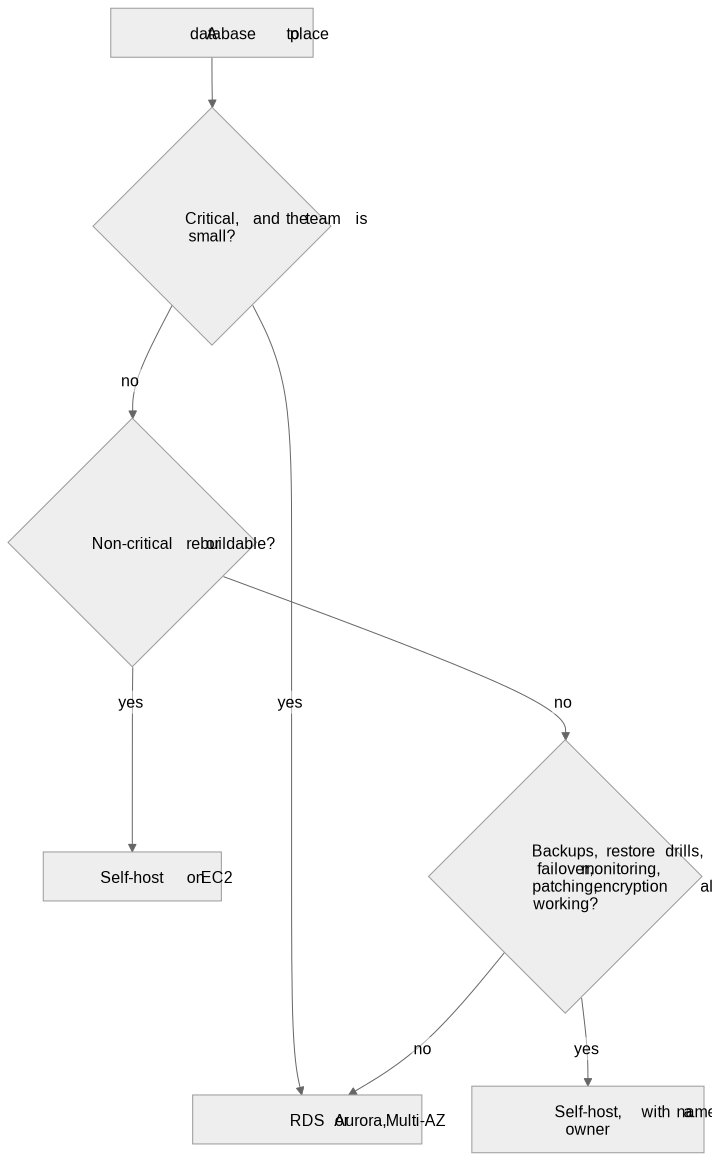
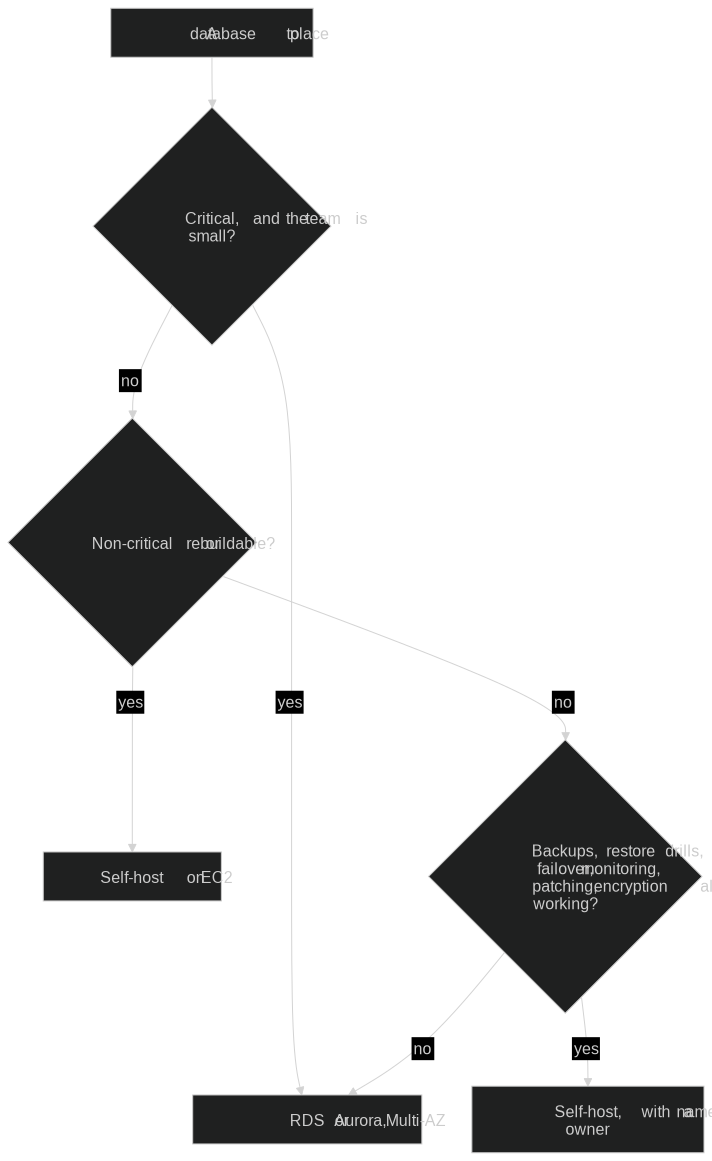
Diagram source
flowchart TD
  A["A database to place"] --> B{"Critical, and the team is small?"}
  B -- yes --> R["RDS or Aurora, Multi-AZ"]
  B -- no --> C{"Non-critical or rebuildable?"}
  C -- yes --> S["Self-host on EC2"]
  C -- no --> D{"Backups, restore drills, failover, monitoring, patching, encryption all working?"}
  D -- yes --> S2["Self-host, with a named owner"]
  D -- no --> R
Case 1: an early SaaS with one important database #
What I’d use: RDS for PostgreSQL (or Aurora), Multi-AZ once revenue depends on it.
- The team’s scarcest resource is attention. RDS removes backups, failover and patching from the list of things that can silently be broken.
- Point-in-time recovery to any second in the retention window is one of the most useful features in AWS, and one of the most quietly elegant: it turns “someone ran a bad
DELETE” from a disaster into a 30-minute restore. - Use RDS Proxy if you have many connections, and set alarms on storage, CPU, replica lag and connection count.
Case 2: regulated data, or a strict audit #
What I’d use: usually RDS, because evidence is easier. Encryption at rest is one setting; automated backups, retention, Multi-AZ, access through IAM and parameter groups are all visible in configuration, CloudTrail and AWS Config. An auditor’s questions (“show me backups are taken and tested; show me who can access production data”) are answered from the console and logs.
Self-hosting can pass an audit too, but you must produce the same evidence yourself: backup logs, restore-drill records, patch history, access reviews. The audit post covers what’s typically asked.
Case 3: cost pressure, non-critical data, or special needs #
This is where the other suspect turns out to be the hero, and self-hosting earns its keep.
Where self-hosting makes sense:
- Non-critical or rebuildable databases: analytics copies, staging and test environments, caches, search indexes. Losing a day there is an inconvenience, not an incident.
- Workloads RDS handles poorly or doesn’t support: extensions not on the supported list, unusual configurations, specific major versions.
- Steady, well-understood production workloads, run by a team with database skills, where the premium adds up to real money every month.
Before you move a production database to EC2, have all of these working:
- Automated backups to S3, with WAL archiving for point-in-time recovery, in another region or account.
- A restore drill, run on a schedule, that rebuilds from backup and verifies the data. The disaster-recovery post measures this: a 1 GB database came back in under 6 seconds from a base backup plus archived WAL, losing only the last 8 seconds of writes.
- Replication and a failover plan, if downtime matters: a standby replica, and a documented or automated promotion.
- Monitoring and alerts: disk, replication lag, connections, long transactions, vacuum, backup age.
- A patching and upgrade routine, with someone responsible for it.
- Encryption at rest (encrypted EBS) and in transit (TLS), plus security groups that allow only the application.
Here’s the twist hidden in the saving: if any of these doesn’t exist, it’s a deferred cost, payable during your worst outage. The encouraging flip side: once they all exist and are rehearsed, you understand your database far better than most teams ever get to.
A side note on Aurora vs RDS #
Aurora’s central idea is a clever one, and worth a moment’s admiration: it separates compute from storage. Storage is replicated across three Availability Zones and grows automatically, replicas share it (so they’re quick to add), and failover is fast. It costs more per hour than RDS for the same instance class, and has its own I/O pricing model. Choose it for read-heavy workloads that need many replicas, fast failover or very large storage. Plain RDS is fine and cheaper for most single-primary applications.
Remember this
- Every row of the RDS markup is a job someone must do.
- Self-hosting saves money only once backups, restores and failover are built and rehearsed.
- Default critical databases to RDS; self-host the non-critical ones first.
Case closed: what I’d do by default #
- Production database on RDS or Aurora, Multi-AZ once downtime costs money, with point-in-time recovery enabled and a restore actually tested.
- Self-host the non-critical databases (staging, analytics, caches) to save money where the risk is low.
- Self-host production only with the six things above in place, and a named person responsible for them.
- Re-evaluate yearly: compare the RDS premium with the engineering time self-hosting takes, including the time spent on drills.
Neither answer is the brave one or the lazy one. Both are ways of making sure someone, whether AWS or you, is doing the unglamorous work that keeps data safe, and there’s real satisfaction in choosing which with your eyes open.
Comments
No comments yet.
Sign in to comment. We'll email you a link; no password needed.