How do you cut an AWS bill by 86%?
From about $14K to about $2K a month, with the platform still serving 5K-10K requests a second at 99.9% uptime. Three levers, in order: delete what nobody uses, right-size what's left from measured peaks, and self-host databases only where you can restore, fail over and patch on your own.
The verdict, which the rest of this post earns: you work in this order:
- Find out where the money goes, line by line, with an owner for every line.
- Delete what nobody uses.
- Right-size what’s left from measured peaks, not averages.
- Self-host the databases where the trade-off is worth it, but only after you can back up, restore, fail over and patch them on your own.
Here’s the case. At CapGrid, as the single technical owner of the infrastructure, I took monthly AWS spend from about $14K to about $2K, roughly 86%, or about $144K a year. The platform kept serving around 100,000 users at 5,000-10,000 requests per second, with 99.9% uptime and sub-200 ms API latency. The three culprits turned out to be over-provisioned resources, managed databases whose premium we could carry ourselves, and services and data nobody was using.
What I enjoy about cost work is that it really is detective work. Every line on the bill is a small story about a past decision, and once you can read those stories, the savings tend to reveal themselves.
Case file
The case An AWS bill of about $14K a month Suspects Over-provisioned resources, managed database premiums, unused services and data Culprit All three, found line by line The fix Delete, right-size from measured peaks, self-host only what you can restore Evidence About $2K a month after, at 99.9% uptime and 5,000-10,000 requests per second
Step 0: examine the scene before touching anything #
This step feels slow, and it’s the one that makes everything after it fast. Before cutting anything, make the bill explainable:
- Cost Explorer, grouped by service, then by usage type, then by resource: it shows not just “EC2” but which instances, volumes and data transfer.
- Cost allocation tags (owner, environment, project) on everything, so each line has someone who can say what it’s for.
- The Cost and Usage Report if you need resource-level detail over time.
Then sort by cost and put one question to every line: who would notice if this disappeared tomorrow? It’s a simple question, and it does more work than any dashboard. Lines nobody can vouch for are the first suspects.
| Lever | Effort | Risk | Typical payoff |
|---|---|---|---|
| Remove unused services and data | Low | Low, if you find owners first | Often the fastest money |
| Right-size over-provisioned resources | Medium | Low to medium | Large where capacity was sized “to be safe” |
| Self-host databases | High | Medium: backups and failover become yours | Large where managed database lines dominate |
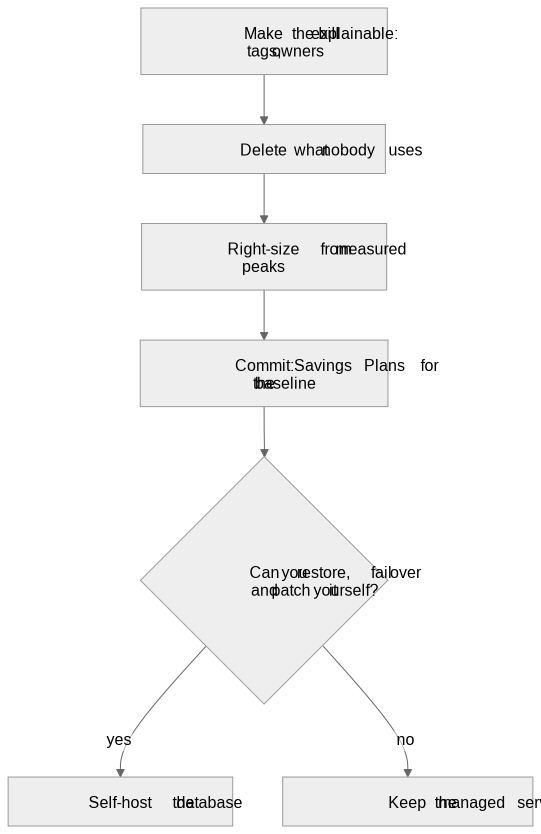
Diagram source
flowchart TD
  A["Make the bill explainable: tags, owners"] --> B["Delete what nobody uses"]
  B --> C["Right-size from measured peaks"]
  C --> D["Commit: Savings Plans for the baseline"]
  D --> E{"Can you restore, fail over and patch it yourself?"}
  E -->|yes| F["Self-host the database"]
  E -->|no| G["Keep the managed service"]
Lever 1: delete what nobody uses #
The usual suspects in an account that has grown for a few years:
- instances and whole environments left running after a project, a test or a demo ended;
- unattached EBS volumes and old snapshots that outlived their instances;
- S3 data with no lifecycle policy: old exports, logs and backups in the most expensive storage class, forever;
- CloudWatch log groups set to “never expire”;
- idle load balancers, NAT gateways and unused Elastic IPs, which cost money every hour whether used or not;
- services trialled once and never switched off.
Make deletion safe, because an innocent bystander is always possible:
- tag or find an owner first;
- stop before you delete (a “scream test”, an old piece of operational folk wisdom): if nobody screams within a set period, remove it;
- snapshot or archive anything irreversible first, with its own expiry date;
- change one thing at a time, so a complaint points at one cause.
Lever 2: right-size what’s left #
This is where measurement pays off. Over-provisioning is usually a past decision made for a peak that never came, or “just in case”. Build the case with evidence:
- Look at weeks of metrics, not a day: CPU, memory (which needs the CloudWatch agent on EC2), network, disk I/O, and the request rate behind them.
- Size for measured peaks plus headroom, not for averages. Averages are the classic false lead: a service that averages 15% CPU but peaks at 70% every evening is already the right size.
- Use the cheapest shape that fits: newer instance generations, Graviton (ARM) where the software runs on it, burstable instances for spiky low-average loads, autoscaling minimums that match the real floor.
- Storage classes matter too: gp3 instead of gp2 volumes, and S3 lifecycle rules to move old data to cheaper tiers.
- Then commit: once the baseline is right, Savings Plans or reserved capacity for what you’ll run regardless. Commit after right-sizing, not before, or you’ll be paying for the waste for a year. The order is the whole trick here, and I find its simplicity quietly satisfying.
Protect the peak: watch p99 latency and error rates for a full traffic cycle after every change, and keep the previous configuration ready to restore. Uptime and latency held throughout, which is the only way a cost cut counts.
Lever 3: self-host databases, carefully #
This is the lever people argue about, so here is the trade-off laid out honestly, like evidence on a table.
A managed database (RDS, Aurora) gives you:
- automated backups and point-in-time recovery;
- patching;
- Multi-AZ failover;
- someone else’s pager for the infrastructure.
You pay for that in a premium on every instance-hour. Self-hosting on EC2 removes the premium and hands every one of those jobs to you.
What you must build before moving a database:
- Backups: automated, encrypted, stored in another account or region, with WAL archiving for point-in-time recovery.
- Restore drills: scheduled, recorded, timed. A backup you haven’t restored is a hope.
- Failover: a replica and a promotion procedure, if downtime matters, plus a clear RPO and RTO.
- Patching and monitoring: someone responsible for them, and alerts on disk, replication lag, connections and backup age.
If you can’t do all four, keep the managed service. The self-host-or-RDS post goes through the checklist, and the disaster-recovery post measures what a restore actually takes.
Keeping the case closed #
The hard part of a cost cut is keeping it. A bill drifts back up unless something stops it:
- AWS Budgets alerts for the account and for each major service;
- a monthly cost review: fifteen minutes with Cost Explorer, looking at what grew and why;
- tags required on every new resource (enforced in infrastructure-as-code review or with tag policies);
- cost as part of design reviews: “what will this cost at ten times the traffic?”
There’s a pleasing side effect. An account where every resource has an owner and a reason is an account you can explain to an auditor. The same clean-up made it easier to secure a successful Big Four technology audit as the sole technical owner (the audit post is the next case to read).
Remember this
- Ask every line on the bill: who would notice if this disappeared tomorrow?
- Size for measured peaks, not averages, and commit only after right-sizing.
- A backup you haven’t restored is a hope.
What to do on Monday #
- Make the bill explainable first: tags, owners, Cost Explorer by usage type.
- Delete before you optimise. It’s the cheapest saving and the lowest risk.
- Right-size from measured peaks, then buy Savings Plans for the baseline.
- Self-host only what you can restore, fail over and patch yourself.
- Put a monthly review and budget alerts in place, so the savings stay saved.
None of this needs clever tooling. It’s ordinary curiosity applied patiently, line by line, and it takes you a long way: a smaller bill, a calmer account, and a system you understand.
Comments
No comments yet.
Sign in to comment. We'll email you a link; no password needed.