How do you prepare for a technology audit as a one-person infrastructure team?
Auditors don't want to see that you're careful; they want evidence that controls exist and work: who can access production, how changes reach it, whether backups restore, and what happens when something goes wrong. How to produce that evidence cheaply, from the systems you already run.
Short answer: the verdict, which the rest of this post earns: an audit checks that controls exist and work, and it judges them by evidence, not by intentions. Most technology audits (IT general controls, SOC 2, ISO 27001, and investor or acquirer due diligence) ask about the same areas:
- access: who can reach production and data, and how that’s reviewed;
- change management: how code and configuration reach production;
- operations: backups that are restored, monitoring, incident handling;
- security basics: encryption, patching, vulnerability management, logging.
As a team of one, you can’t produce evidence by hand. Build the controls so they leave evidence automatically: pull requests, CI logs, CloudTrail, backup and restore-drill logs, and a short written policy for each area.
The case I’m drawing on: at CapGrid, I was the sole technical owner of the infrastructure through a successful technology audit by a Big Four firm. This post is the general approach: what’s asked, and how to answer it without a compliance team.
An audit feels a little like an interrogation. The auditor asks a question, and every answer needs proof. Audits have a reputation for being dreary, but there’s a reassuring idea underneath them: a system that’s well run can describe itself. The goal here is to build things so that the evidence writes itself while you get on with the work.
Case file
The case A technology audit, and one person runs all the infrastructure Suspects Good intentions, “I check it regularly”, documents written the night before Culprit Controls that leave no evidence: auditors judge proof, not care The fix Build controls that record themselves: pull requests, CI logs, CloudTrail, restore-drill records, one-page policies Evidence CapGrid: sole technical owner of the infrastructure through a Big Four audit
The questions, and the evidence that answers them #
| Area | Typical questions | Evidence that answers them |
|---|---|---|
| Access management | Who has access to production, the cloud console and databases? Is it least privilege? Is MFA enforced? Are leavers removed promptly? Is access reviewed? | IAM users, roles and policies exported; MFA enforced (and a report showing it); SSO groups; a quarterly access-review record; joiner and leaver tickets |
| Change management | How does a change reach production? Is it reviewed and tested? Can one person push to production alone? | Branch protection rules; pull requests with approvals; CI runs with test results; deploy logs tying each release to a commit |
| Backups and recovery | Are backups taken, protected and restorable? How long would recovery take? | Backup configuration and job logs; retention settings; restore-drill records with dates and times; a recovery runbook |
| Monitoring and incidents | How do you know something is wrong? What happens next? Are incidents recorded and learned from? | Alarms and dashboards; on-call or escalation rules; incident log; post-incident reviews |
| Logging | Are administrative actions logged, protected and retained? | CloudTrail enabled in all regions with log-file validation, sent to a protected bucket; retention policy |
| Data protection | Is data encrypted in transit and at rest? Who can see personal data? | TLS configuration; encryption settings on databases, volumes and buckets; data-classification note; access lists |
| Vulnerability and patch management | How are dependencies and systems kept up to date? | Dependency scanning in CI, image scanning (for example Trivy), patch schedule and records |
| Vendors and policies | Which third parties process your data? Are there written policies? | A vendor list with what each processes; short policies for access, change, backup, incident and acceptable use |
Look at the right-hand column. Almost nothing in it is a document you write the night before. It’s exports, logs, records and settings: traces the system leaves behind as it works. That’s the clue to the whole case.
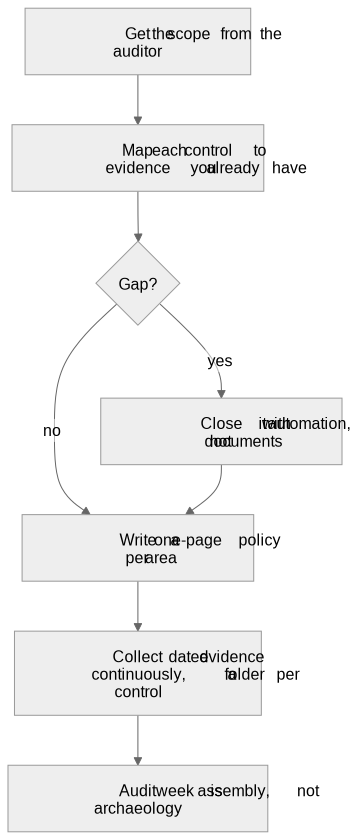
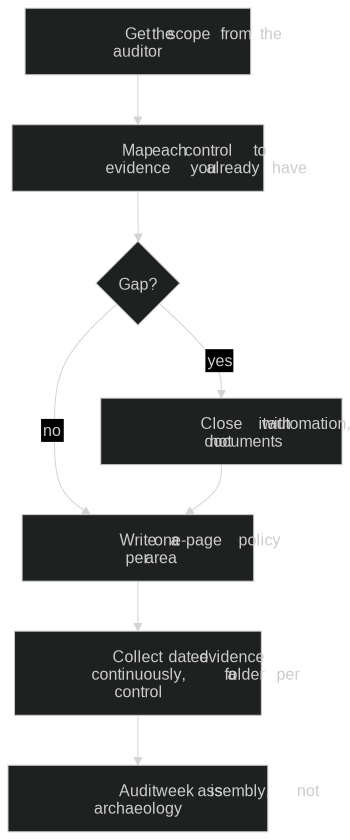
Diagram source
flowchart TD
  A["Get the scope from the auditor"] --> B["Map each control to evidence you already have"]
  B --> C{"Gap?"}
  C -- yes --> D["Close it with automation, not documents"]
  C -- no --> E["Write a one-page policy per area"]
  D --> E
  E --> F["Collect dated evidence continuously, a folder per control"]
  F --> G["Audit week is assembly, not archaeology"]
Case 1: access control, as one person #
This is the area that feels most awkward for a team of one, and also the one where a few small habits go a long way.
The risk auditors focus on: one person with unlimited, unreviewed access. You can’t fix “one person”, but you can make access deliberate and visible:
- No daily use of the root account; MFA on root, and on every human user.
- SSO or IAM roles with least privilege, separating everyday work from break-glass administration.
- Production database access through a role or bastion, logged, not shared passwords.
- A quarterly review: export who has access to what, sign off on it, and keep the record. A dated document or ticket is evidence; “I check it regularly” isn’t. That’s the false lead in every audit: intentions sound convincing, and they count for nothing.
Case 2: change management without a second engineer #
“Can one person change production without review?” is a classic finding. Answers that work for small teams:
- Branch protection: changes reach
mainonly through pull requests, with CI required to pass. - Review by someone: another engineer, or a lead from another team, for production-affecting changes. Where nobody else exists, a documented self-review checklist, with automated tests as a compensating control, is better than nothing, and auditors will tell you whether it’s enough for their scope.
- Deploys only from CI, never from a laptop, so every release maps to a commit, a review and a test run.
- Infrastructure as code (Terraform or CloudFormation) for the same reason: infrastructure changes become reviewed pull requests with history.
My engineering-standards repository collects the review, release and incident practices that make this kind of evidence routine.
Case 3: backups and disaster recovery #
It’s the best question an auditor asks, because it’s exactly the right one. It isn’t “do you back up?” but “show me a restore.” A backup nobody has restored is a suspect with no alibi.
- Automated backups with defined retention, stored in another account or region, encrypted.
- A restore drill on a schedule, with a dated record: what was restored, from when, how long it took, and the checks run on the restored data. The disaster-recovery post shows one, and measures the resulting RPO and RTO.
- A short runbook: the steps to rebuild, and who does them.
A preparation plan that fits one person #
- Get the scope from the auditor: the systems, the period under review, and the framework or control list.
- Map each control to evidence you already have, and list the gaps.
- Close the gaps with automation, not documents: enforce MFA, turn on CloudTrail and AWS Config (the observability post covers log retention and access), require PR reviews, schedule backups and drills.
- Write short policies (one page each) describing what you actually do: access, change, backup, incident, vendor management.
- Collect evidence continuously in one place (a folder per control, with dated exports and screenshots), so audit week is assembly, not archaeology. This is the step that turns an audit from a scramble into something close to calm.
- Be straightforward about compensating controls. A small team will have them; explain them clearly instead of hiding them.
Remember this
- Auditors judge evidence, not intentions.
- Build controls that leave their own trail: PRs, CI, CloudTrail, drill records.
- “Show me a restore” is the question to be ready for.
Case closed: what I’d do from day one, audit or not #
- MFA everywhere, no root use, SSO with least privilege, and a quarterly access review.
- Pull requests, required CI and deploys from CI only; infrastructure as code.
- CloudTrail in all regions to a protected bucket, and AWS Config.
- Backups in another account or region, and a monthly restore drill with a record.
- Alarms that reach a person, and an incident log with short write-ups.
- Dependency and image scanning in CI.
That’s the reveal: they’re all good engineering anyway. An audit asks you to prove it.
And there’s real pleasure in that proof. When every change, login and restore leaves its own trail, you get to answer hard questions with a link instead of a promise.
Comments
No comments yet.
Sign in to comment. We'll email you a link; no password needed.