How should users sign up?
Email and password is universal but leaves you guarding passwords. Magic links remove passwords but depend on email speed. Social login is one click but ties users to another company. Passkeys are the most secure and still unfamiliar to many. B2B customers will ask for SSO. How to choose, and how…
Short answer: the verdict we’ll work towards: pick by audience, and offer at most two or three ways.
- Consumer apps: passkeys plus one fallback (email magic link or social login). Passkeys can’t be phished and need nothing to remember.
- B2B SaaS: email (password or magic link) to start, and SSO (SAML or OIDC) for customers who ask; larger customers will.
- Internal tools: your company’s identity provider only. No local accounts.
- Whatever you choose: confirm the email before it matters, never reveal whether an address has an account, and make account linking explicit.
Sign-up is the first conversation your product has with someone, and it’s full of small, thoughtful design decisions. It’s also a scene with an impostor in it. Each method below is a different answer to the same question: how do we know it’s really you, without making you work for it?
Case file
The case How do we know it’s really you, without making you work for it? Suspects Email + password, magic links, one-time codes, social login, passkeys, enterprise SSO, invites Culprit In the “expired” link mystery: the corporate mail scanner opening links automatically The fix Pick by audience, offer at most two or three methods, links that open a page with a button Evidence The blogging platform I run: drafts right away, publishing only after the email is confirmed
The suspects at a glance #
| Method | User effort | Security | You must build or run | Watch out for |
|---|---|---|---|---|
| Email + password | Familiar; must remember a password | Weak passwords and reuse; phishable | Password hashing, reset flow, breach checks, rate limits | Credential stuffing |
| Magic link (emailed sign-in link) | No password; must switch to email | Only as strong as the inbox | Email delivery, single-use links, expiry | Slow email; links opened on another device; mail scanners clicking links |
| Email one-time code | Type 6 digits | Similar to magic links | Same as above | Phishing pages that relay the code |
| Social login (Google, Apple, GitHub via OIDC) | One click | Good: the provider handles passwords and 2FA | OIDC integration, account linking | Users without that account; provider outages; “Hide my email” relay addresses |
| Passkeys (WebAuthn) | Fingerprint or face, no typing | Strongest: phishing-resistant, nothing reusable stored | WebAuthn server library, a fallback for new devices | Unfamiliar to some users; account recovery |
| Enterprise SSO (SAML / OIDC) | Uses work login | As strong as the customer’s IdP | Per-customer configuration, domain verification, JIT provisioning | Misconfigured IdPs; users who leave the company |
| Invite-only | Click an invite | Controls who joins | Invitation tokens with expiry | Invitations forwarded to the wrong person |
Read the last column as a list of motives. Every method has a way to fail, and the art is choosing the ones whose failures your audience won’t trip over.
Case 1: a consumer app #
This is where passkeys shine. The situation: a writing app or a marketplace; users sign up on their phones and laptops.
What I’d offer: “Continue with Google / Apple” plus email with a passkey or magic link.
- Social login removes most friction on mobile.
- Email is the fallback for people who don’t want to link accounts.
- Offer to add a passkey right after sign-up; next time, sign-in is a fingerprint (the 2FA post explains why passkeys resist phishing). I still find it remarkable that the most secure option is also the one with the least typing.
Case 2: a B2B SaaS #
The situation: teams sign up with work addresses; later, a customer’s IT department wants to control access.
What I’d offer:
- Email sign-up (password or magic link) with email confirmation before publishing or inviting; the blogging platform I run lets new accounts write drafts immediately but publish only after confirming the address, which stops throwaway accounts from publishing spam.
- SSO per organisation once a customer asks: they verify their domain (a DNS record), configure their identity provider, and from then on everyone with that domain signs in through it. Optionally provision and deprovision users with SCIM.
- Invites for teammates, scoped to one organisation and expiring in days.
Case 3: an internal tool #
The situation: an admin panel or reporting tool for employees.
What I’d do: sign in only through the company’s identity provider (Google Workspace, Microsoft Entra ID, Okta). No local passwords means leavers lose access the moment IT disables them. Put the tool behind an identity-aware proxy if it has no auth of its own.
The clues every method shares #
Whichever methods you pick, a handful of small rules do most of the protecting. Several of them exist because someone noticed a sneaky failure and found a cheap fix.
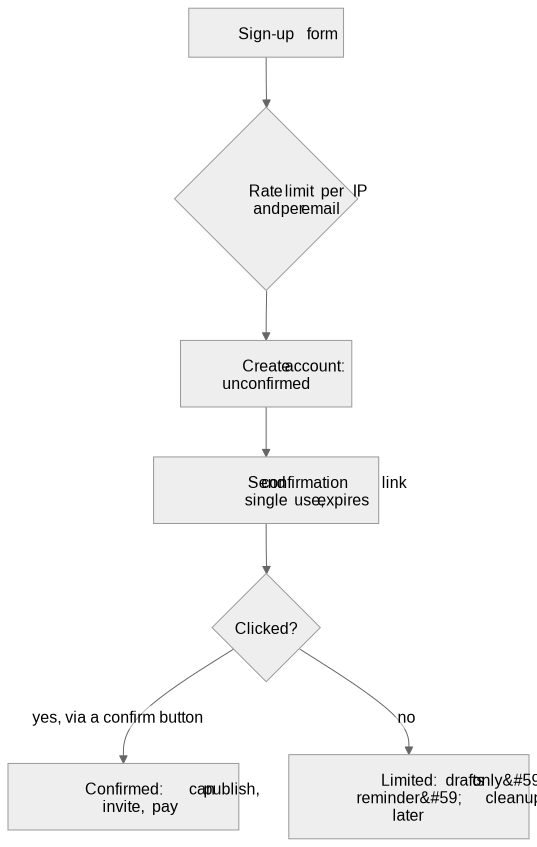
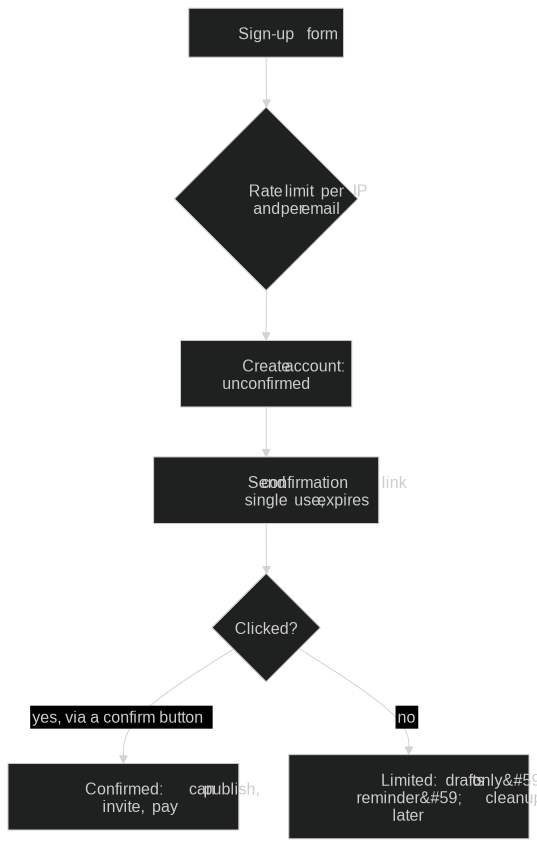
Diagram source
flowchart TD
  S[Sign-up form] --> R{Rate limit per IP<br/>and per email}
  R --> C[Create account: unconfirmed]
  C --> E[Send confirmation link<br/>single use, expires]
  E --> V{Clicked?}
  V -->|yes, via a confirm button| OK[Confirmed: can publish, invite, pay]
  V -->|no| L[Limited: drafts only#59; reminder#59; cleanup later]
- Confirm the email before anything that affects others (publishing, inviting, sending email).
- Links in emails open a page with a button, and only the button press uses the link. This one is my favourite little mystery: users swore their link had expired before they ever clicked it. The culprit was the corporate mail scanner, which opens links automatically; if a GET request used the link, the scanner would consume it before the user could. One extra click, and a whole class of baffling “my link already expired” reports disappears.
- No account enumeration: “Forgot password” answers the same whether or not the address exists. (Sign-up itself usually can’t hide it; rate-limit it instead.)
- Account linking is explicit: if someone signs in with Google using an address that already has a password account, ask them to sign in the old way first, then link. Merging automatically lets anyone who controls an unverified social account take over.
- Record consent: which version of the terms, and when.
- Rate-limit sign-ups and sign-ins per IP and per email (rate-limiting post), and put CAPTCHA-like friction only where abuse appears.
Remember this
- Pick sign-up methods by audience, and offer at most two or three.
- Confirm the email before anything that affects others.
- Make email links open a page with a button, so scanners can’t use them up.
Case closed: what I’d do by default #
- Consumer: social login + email; prompt for a passkey after sign-up.
- B2B: email + confirmation, invites, and SSO per organisation when customers ask.
- Internal: company IdP only.
- Always: confirmation before impact, scanner-safe links, no enumeration on reset, explicit linking.
Get these right and sign-up stops being a chore people push through and becomes a small welcome: quick for the person arriving, and hard for anyone pretending to be them.
Comments
No comments yet.
Sign in to comment. We'll email you a link; no password needed.