Which kind of 2FA should you offer?
SMS codes are better than nothing and the weakest option. Authenticator-app codes (TOTP) stop password reuse but not phishing. Push approvals invite fatigue attacks. Security keys and passkeys are the only phishing-resistant option. What each defends against, what to offer, and why recovery codes…
Short answer: the verdict, which we’ll see earned: offer passkeys or security keys where you can, authenticator apps (TOTP) as the common option, and recovery codes always. Keep SMS only as a fallback for consumers who have nothing else, and require phishing-resistant methods for admins.
Picture the case. A user has 2FA turned on, types their password and a fresh six-digit code, and still loses their account within the minute. How? Every option here is a sincere attempt to answer one question: how do we know it’s really you, even when your password isn’t secret any more? Some answers are much cleverer than others, and the difference is a pleasure to see.
Case file
The case 2FA is on, the user types a fresh code, and still loses the account within the minute Suspects SMS codes, email codes, TOTP, push approvals Culprit A look-alike page that relays the code to the real site in real time The fix Passkeys or security keys, bound to the real domain, plus recovery codes Evidence The blogging platform I run: TOTP for its admin area, secrets encrypted, single-use recovery codes
The suspects: what each one defends against #
| Method | Stops password reuse and stuffing | Stops real-time phishing | Stops SIM swap | User effort | Notes |
|---|---|---|---|---|---|
| SMS code | Yes | No | No | Low | Interceptable; SIM-swap attacks; costs money per message |
| Email code / link | Yes | No | Yes | Low | Only as strong as the inbox, often the same password |
| TOTP (authenticator app) | Yes | No | Yes | Medium | Free, offline; a phishing page can relay the code within 30 s |
| Push approval | Yes | Partly | Yes | Low | “MFA fatigue”: attackers spam prompts until someone taps Approve; number matching helps |
| Security key / passkey (WebAuthn) | Yes | Yes | Yes | Lowest | Bound to the real domain: a look-alike site gets nothing usable |
The column that cracks the case is “Stops real-time phishing”. Only one row says yes.
The reveal: why only WebAuthn stops phishing #
This is the most interesting part of the whole investigation. The browser tells the authenticator which site is asking, and the key only signs for the domain it was registered on. A code (SMS, TOTP) is a number the user can be tricked into typing anywhere. That’s how our victim lost the account: a look-alike page took the code and relayed it. WebAuthn takes the human out of the one judgement humans are worst at, spotting a convincing fake. It’s a beautifully simple fix: the proof itself knows where it belongs.
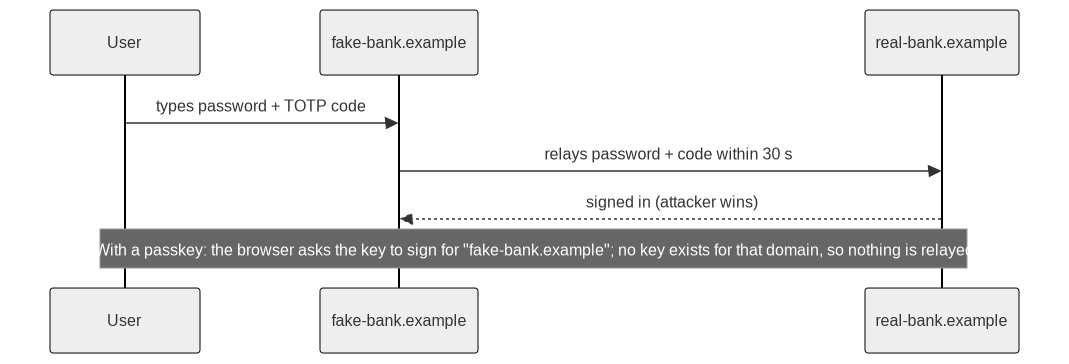
Diagram source
sequenceDiagram
  participant U as User
  participant F as fake-bank.example
  participant R as real-bank.example
  U->>F: types password + TOTP code
  F->>R: relays password + code within 30 s
  R-->>F: signed in (attacker wins)
  Note over U,R: With a passkey: the browser asks the key to sign for "fake-bank.example"#59; no key exists for that domain, so nothing is relayed
Case 1: admin panels and staff accounts #
What I’d require: phishing-resistant MFA (security keys or passkeys), or at minimum TOTP with short sessions and re-authentication for dangerous actions.
The blogging platform I run protects its platform-admin area with TOTP: the admin scans a QR code, confirms a code before 2FA turns on, and gets single-use recovery codes. The TOTP secret is stored encrypted, and codes can’t be replayed within their time window.
Case 2: a consumer app #
What I’d offer: passkeys as the primary sign-in (often replacing the password entirely; the sign-up post covers the choices), TOTP as an option, and SMS only for people who have nothing else, with clear guidance to upgrade.
- Make 2FA opt-in but prompted after sign-up and before sensitive actions.
- Remember trusted devices for a while, so users aren’t asked every time.
Case 3: a B2B SaaS #
What I’d do: let each customer’s admin require 2FA for their organisation, or rely on their SSO provider’s MFA. Large customers will ask for the policy, and will check it in security questionnaires.
The back door: recovery is half the design #
This is the part that’s easy to forget and costly to get wrong. Every 2FA method gets lost: phones break, keys are left at home.
- Recovery codes: 8-10 codes shown once at setup, stored hashed, each usable once. Tell users to save them somewhere other than the phone.
- Multiple factors: encourage registering two (a passkey on the phone and one on a laptop, or a spare key).
- Account recovery by support must be harder than the 2FA it bypasses: identity checks, a waiting period, notifications to every known contact. Weak recovery turns your strong 2FA back into a password, and a careful attacker will always try the back door before the front.
Implementation notes #
- TOTP: RFC 6238, 30-second steps, accept one step either side for clock drift, reject a code already used in its window, rate-limit attempts, store the secret encrypted.
- WebAuthn: use a maintained server library; store credential IDs and public keys only; require user verification (PIN or biometrics) for passkey sign-in.
- Re-authentication: ask for the second factor again before changing email, password, payout details or 2FA itself.
- Notify users by email when 2FA is turned off or a new factor is added.
Remember this
- Any code a user can type, a phishing page can relay.
- Only WebAuthn signs for the real domain, so only it stops phishing.
- Recovery must be harder than the factor it bypasses.
Case closed: what I’d do by default #
- Passkeys first; TOTP as the widely understood option; SMS only as a last resort.
- Phishing-resistant MFA required for admins and staff.
- Recovery codes at setup, and support recovery that’s harder than the factor.
- Re-authenticate for sensitive changes, and notify on every factor change.
It’s heartening that the strongest option has turned out to be the easiest to use. A tap or a glance, bound to the real domain, is a brilliant answer to an old problem.
Comments
No comments yet.
Sign in to comment. We'll email you a link; no password needed.